Judge.me Review: Can a Shopify Store Really Run Product Reviews for Free?
We installed Judge.me on a Shopify dev store and stayed on Free: setup in under 10 minutes, widget and email controls, and where the $15 Awesome plan kicks in.
9 Min Read

Sr. Product Designer

Product reviews become important once a Shopify store starts getting customers. But a new merchant may not want another monthly app bill.
Judge.me offers a Free plan for collecting and showing reviews. Its Awesome plan costs $15 per month.
That raises a useful question. Can a Shopify merchant run product reviews for free, or will the limits soon require the paid plan?
We installed Judge.me on a Shopify development store with the Dawn theme. We stayed on Free and tested setup, theme links, widget controls, email styling, review tools, imports, and analytics.
Key Takeaways
- The Free plan is useful: We set up a working review widget without paying. It did not feel like a limited demo.
- Setup does not need a developer: We configured the widget in under 10 minutes. Judge.me gave clear steps for the Shopify theme app embeds.
- Branding is where Free runs out: Review-request email styling was the clearest limit. Logo size, alignment, fonts, and corner styling required the Awesome plan.
- Pricing is simple: $0 or $15 per month. The real question is when the branding limits start affecting how customers see your store.
Our Verdict
Judge.me is easy to recommend for a new Shopify store that needs reviews without another monthly cost.
We went from install to a set-up review widget in under 10 minutes. The interface was clear. Judge.me also handled the theme steps well. Free gave us enough control for a useful review setup.
The limits appeared when we moved from basic tools to branding. Review-request email styling was the clearest example.
We could upload a logo on Free. But its size, alignment, fonts, corner style, and other design controls needed Awesome.
The choice is simple. Start with Free if you mainly need to collect and show reviews. Budget $15 per month for Awesome if the review experience must closely match your brand.
What Judge.me Offers
Judge.me collects product and store reviews and shows them on a Shopify storefront. It supports photos, videos, widgets, star ratings, request emails, imports, review controls, analytics, and app links.
The app has been on the Shopify App Store since 2015. When we checked on August 31, 2026, it showed a 5.0 rating across more than 44,000 reviews.
Popularity was not our main question. We wanted to know how far a merchant can get before the Free plan becomes a problem.
What We Tested
We installed Judge.me on a Shopify development store using the Dawn theme and chose the Free plan.
Our hands-on test covered:
- installation and permissions,
- Judge.me's onboarding process,
- Shopify theme app embeds,
- adding the review widget,
- widget configuration,
- Free versus paid customisation controls,
- review-request email styling,
- review management screens,
- import options,
- analytics,
- and pricing and plan limits.
This was mainly a setup test. We did not run a live review campaign or a large import. We did not measure sales or page speed, and we did not contact support.
We do not use this test to make claims about tasks we did not complete.
For these reasons, this is a Level 2 — Partial Hands-On Test.
What Public Sources Add
Our setup evidence is the main basis for this review. On August 31, 2026, we also checked Judge.me's Shopify listing, pricing page, and a sample of low ratings.
The public sources confirmed the simple Free and Awesome plan structure. They also described more review, sharing, request, and app-link tools than we tested. Treat those as product claims, not results from our store.
The low-rating sample raised concerns about support, migration, review checks, unwanted request emails, widgets, and billing. These reports came from a negative slice and were not seen in our test.
If you plan a large migration or email campaign, test it with controlled data first.
Can You Set Up Judge.me Without a Developer?
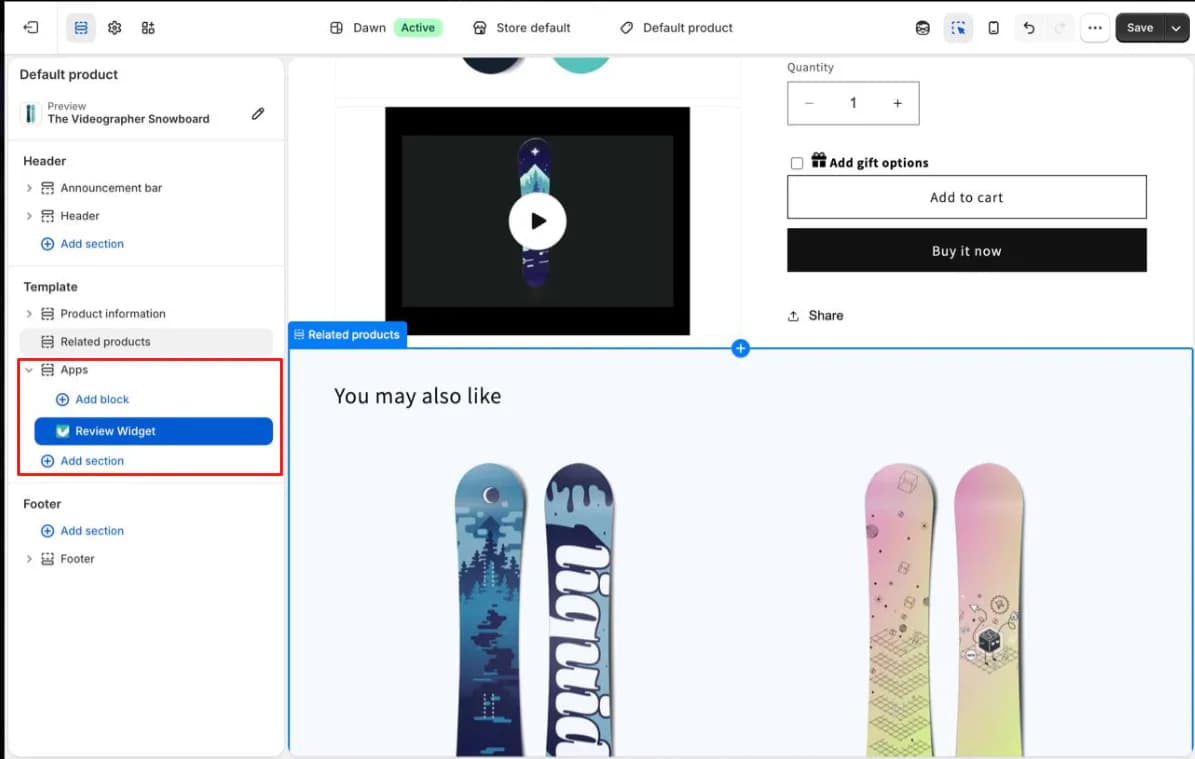
For the core setup, yes. From installation to a configured review widget took us under 10 minutes.
One harder setup step is linking the app to the Shopify theme. Judge.me needs two theme app embeds: its core snippet and the review widget. This may confuse a merchant who has never used the theme editor.
Judge.me handled this step well. It opened the theme editor and showed the exact toggle to enable. It also pointed out the Save button and detected the saved change. Both embeds worked on the first try.
There are still two trips between Judge.me and the theme editor. But we never reached a point where a developer felt necessary. For a newer Shopify merchant, that is an important strength.
Is the Free Plan Actually Enough?
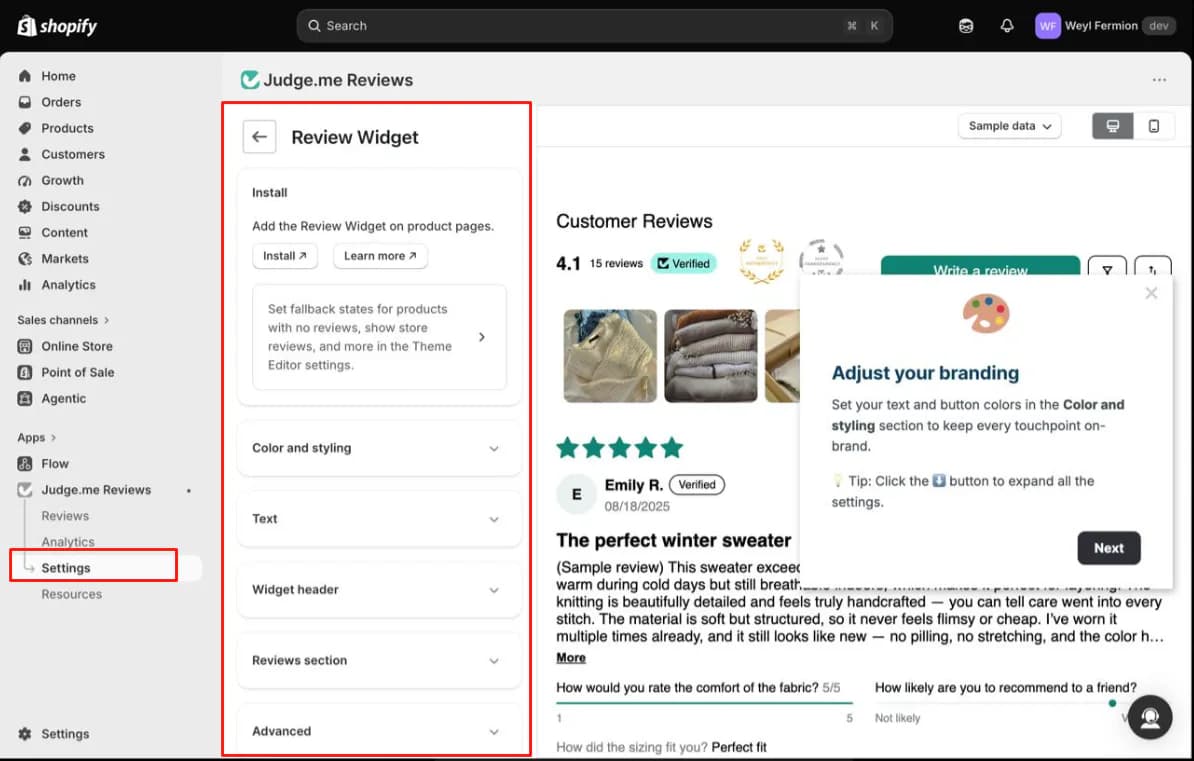
For many smaller stores, yes. The Free plan is not a restricted demo designed to force an immediate upgrade.
We could configure the core storefront review experience, including:
- star and bar-chart colours,
- button colours,
- text colours,
- the widget title,
- review terminology,
- empty-state messaging,
- button labels,
- and the widget layout.
The live previews made basic styling easy. Judge.me also has an Advanced area with custom CSS and a Liquid widget snippet. These give skilled frontend teams another option when the standard controls are not enough.
Free goes far if you simply need customers to see product reviews. The limits become clearer when every part must match your brand.
Where the Free Plan Starts to Feel Restrictive
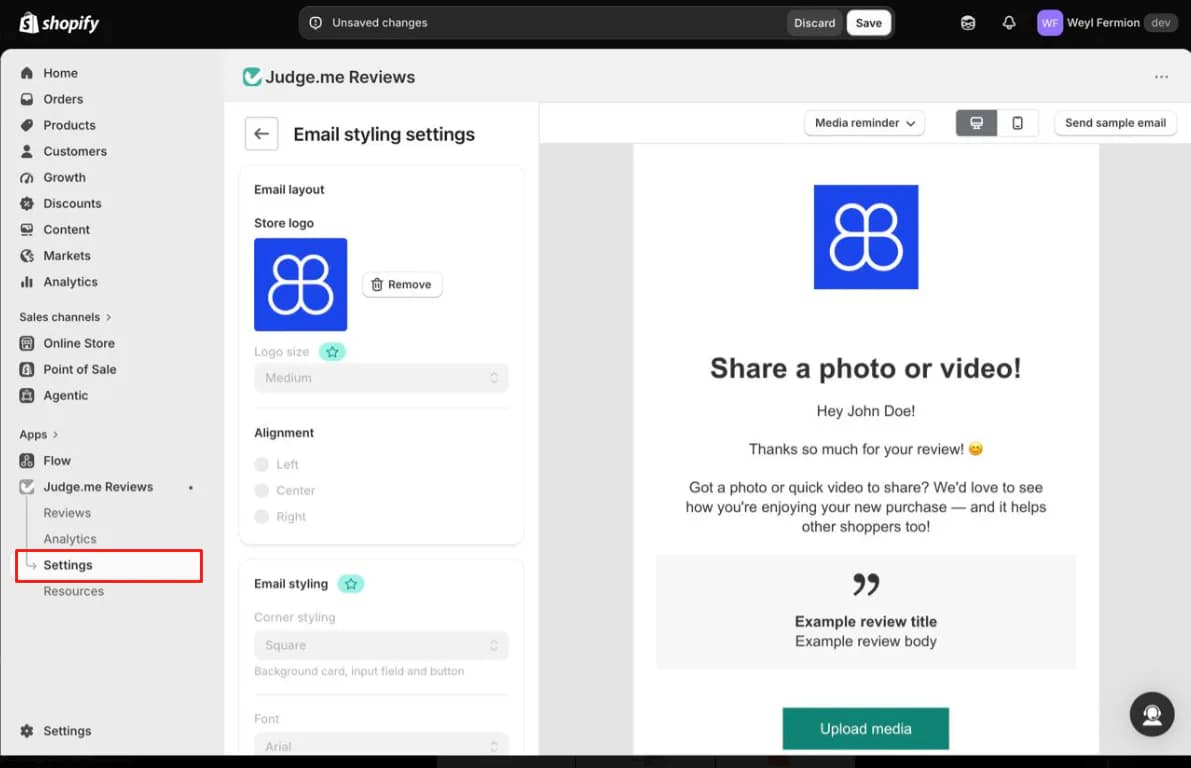
Judge.me shows paid controls inside the interface. As we worked, we kept finding controls marked for Awesome.
These included widget corners, header text, rating display, bar-chart style, custom questions, AI review insights, and other design controls.
Most of these would not stop a smaller store from using Judge.me. Then we reached email styling, the clearest limit in our test.
On the Free plan, we could upload our store logo to the review-request email. But we could not fully control its size or alignment. Fonts and some other styling controls were also locked behind Awesome.
That difference matters. A new store may only need review emails that work. A mature brand may want every email to use the same text, spacing, and images.
This is the practical line. Free gives you the core review tools. Awesome gives you more control over how they fit your brand.
Managing Reviews, Imports, and Analytics
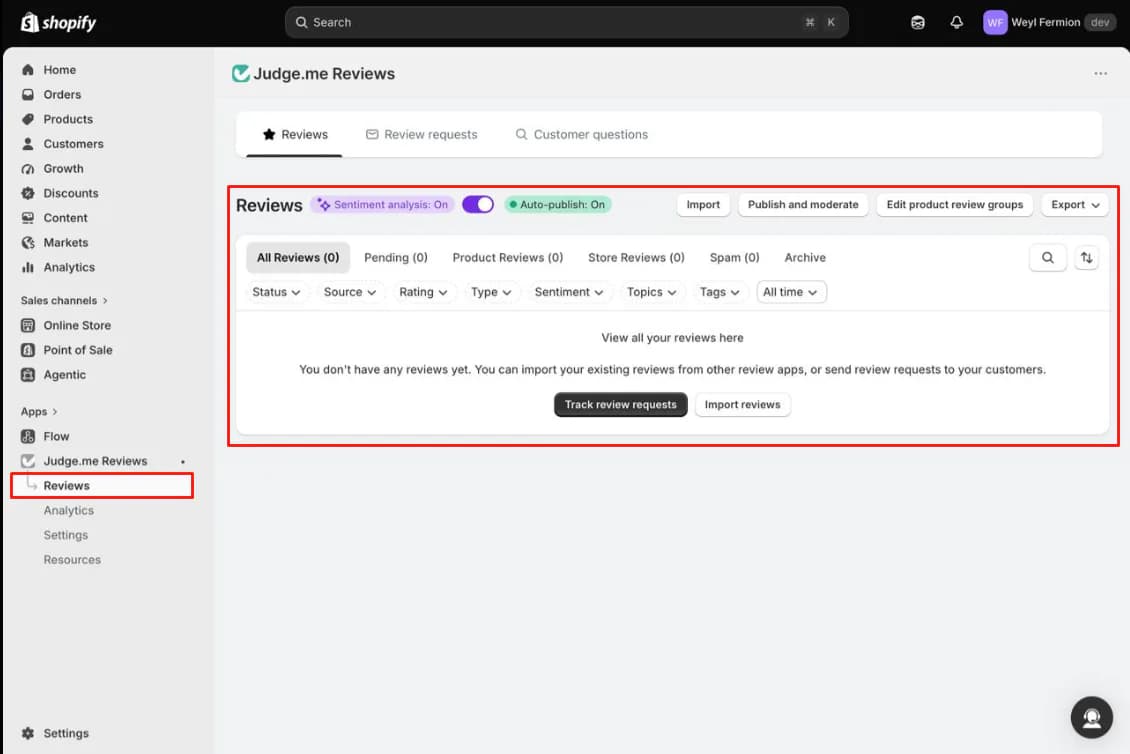
We also opened the Reviews and Analytics areas. Our store had no real review volume, so we could not test these tools under pressure. Still, the management screen offered many controls.
Reviews can be filtered by status, source, rating, type, sentiment, topics, tags, and date. The Analytics area includes metrics on review collection and requests, plus CSV export.
Judge.me offers imports from review apps, spreadsheets, marketplaces, and another Judge.me store. We did not run a migration.
An import option only proves that the feature exists. It does not prove that thousands of reviews will move without errors. Test a sample before moving a large review library.
Pricing: Free vs Awesome
Judge.me keeps pricing unusually simple.
| Plan | Price | Best suited for |
|---|---|---|
| Free | $0/month | Stores that mainly need review collection and display |
| Awesome | $15/month | Stores that need deeper customisation, integrations, AI features, and more control |
Free lists unlimited product and store reviews, photos, videos, widgets, star ratings, imports, and other core tools. Awesome adds deeper styling and more tools for established stores.
This simple pricing is a strength. Do not ask only whether you can avoid paying $15. Ask when the extra control becomes worth the cost.
A new store may not need Awesome right away. A mature brand may need it much sooner.
What We Liked
- Setup is genuinely easy: Installation to a configured widget took under 10 minutes.
- The Free plan is actually usable: You can configure a meaningful review experience without reaching for a credit card.
- Theme setup is well guided: Judge.me explained Shopify's theme app embeds clearly. Both worked on the first try.
- Technical teams get more control: Custom CSS and Liquid can help when the standard settings are not enough.
- Pricing is predictable: The jump from $0 to $15 per month is easier to budget for than usage-based pricing.
What Could Be Better
- Free-plan limits appear slowly: Locked controls sit across the app. You learn where Free stops as you work.
- Branding is where Free feels most limited: The review-request email was the strongest example in our test.
- Some key tasks remain untested: We did not test large imports, live request emails, support, or long-term use.
Who Judge.me Is Best For
Judge.me is best for new and smaller Shopify stores that need reviews without another monthly cost. Start with Free if you mainly need to collect and show product reviews.
It also suits stores that want a clear price instead of a bill that grows with orders or reviews. Frontend skills can make Free more useful through CSS and Liquid — and when the review widgets need to match your brand exactly, Shopify theme and storefront development can handle that styling instead of upgrading just for design controls.
Who Should Consider an Alternative
Choose Awesome from the start if every widget and customer email must closely match your brand. At $15 per month, it may cost less than working around Free's design limits.
Merchants planning a large review migration or relying on specific integrations should test those workflows carefully first.
We did not test competing review apps for this article. We are not ranking them against Judge.me.
Final Verdict
Judge.me solves the core problem well. A merchant can set up product reviews quickly without a developer or another monthly bill.
Install was easy in our test. The theme steps worked well, and the widget had useful controls. We reached a usable setup in under 10 minutes.
The trade-off is styling. As brand needs grow, more email and widget controls require the $15 Awesome plan.
The choice is clear. A new store can start with Free. A growing brand that needs tighter design control should budget $15 per month.
Upgrade when Free starts to weaken the customer-facing brand experience, not only because Awesome lists more features.
The Free plan is not just there to let you try Judge.me. For the right Shopify merchant, it is enough to actually start solving the product-review problem.
Frequently Asked Questions
Is Judge.me free?
Yes. Free costs $0 per month. It lists unlimited product and store reviews, photos, videos, widgets, star ratings, and imports. We ran our whole test on Free.
How much does Judge.me cost?
There are two plans: Free at $0 per month and Awesome at $15 per month. Awesome adds deeper customisation, integrations, AI features, and more control over branding.
Do you need a developer to install Judge.me?
Not for the core setup in our test. Judge.me opened Shopify's theme editor and showed the exact toggles. It also detected when we saved them. Both app embeds worked on the first try.
What can't you do on the Judge.me Free plan?
Review-request email styling had the clearest limits in our test. Logo size, alignment, fonts, and corner style required Awesome. Other paid controls included widget corners, header text, custom questions, and AI review insights.
Can Judge.me import reviews from another app?
Judge.me shows import paths for other review apps, spreadsheets, marketplaces, and another Judge.me store. We did not run a migration, so test that workflow yourself before moving a large review database.