CWILL Popup Email Marketing Review: Is 30 Free Subscribers a Month Enough?
Our CWILL (SendWILL) Popup Email Marketing review covers popups, email branding, automations, the 30-subscriber Free plan cap, and paid pricing in 2026.
13 Min Read

Content Strategist

A new Shopify store usually wants two things from email marketing. First, a popup that turns visitors into subscribers. Second, a few emails that go out on their own, such as a welcome email and a cart reminder. Many stores want both from one app, and they want to start for free.
CWILL Popup Email Marketing promises exactly that. The app was known as SendWILL and EcomSend, and it still appears as "CWILL(SendWILL)" in the Shopify admin. It combines popups, email campaigns, and automations in one place, and it has a Free plan. The catch is in the plan card: Free covers 30 new subscribers a month.
So the question for a small store is simple. Can you grow and email your list on CWILL's Free plan, or will the 30-subscriber cap push you onto a paid plan almost straight away?
We installed the app on a Shopify test store, stayed on the Free plan, and inspected every main section of the admin. The tools are broad for a free app. The limit is not the features. It is the number of people you are allowed to collect.
Key Takeaways
- Popups, email, and automations in one app: The admin covers popups, subscribers, campaigns, automations, analytics, and email branding.
- Two popup templates: We saw an opt-in popup and a spin-the-wheel popup, both with a built-in discount offer.
- Strong automation library: We counted 5 preset automations and 9 custom flow templates. Only 2 templates carried a Pro badge.
- The real limit is subscribers: Free allows 30 new subscribers and 2,000 emails a month. Paid plans are priced by how many new subscribers you collect.
- Some plan details don't match: The app offered a 7-day free trial, while the Shopify listing says 14 days.
- Testing scope: We inspected the admin on the Free plan. We did not publish a popup on the storefront, collect a subscriber, send an email, or turn on an automation.
Our Verdict
CWILL Popup Email Marketing gives a small Shopify store a lot of tools at no cost. The popup editor, email branding editor, and automation templates are all there on the Free plan. The setup guide also makes the first steps clear.
The Free plan is best seen as a starter, though. Thirty new subscribers a month is enough to set things up and test them. A store with steady traffic is likely to pass that number quickly. After that, pricing starts at $11.90 a month and rises with the number of new subscribers you collect.
Our verdict: CWILL is worth installing if you want popups and email in one simple app and expect to pay once your list starts growing. If you need a free plan that keeps collecting signups at volume, check the limits closely before you build around it.
What CWILL Popup Email Marketing Offers
CWILL is built by CWILL INC, the company formerly known as Channelwill. It is the same developer behind CWILL (Trustoo) Product Reviews. The popup app launched on the Shopify App Store in October 2022 and carries the Built for Shopify badge.
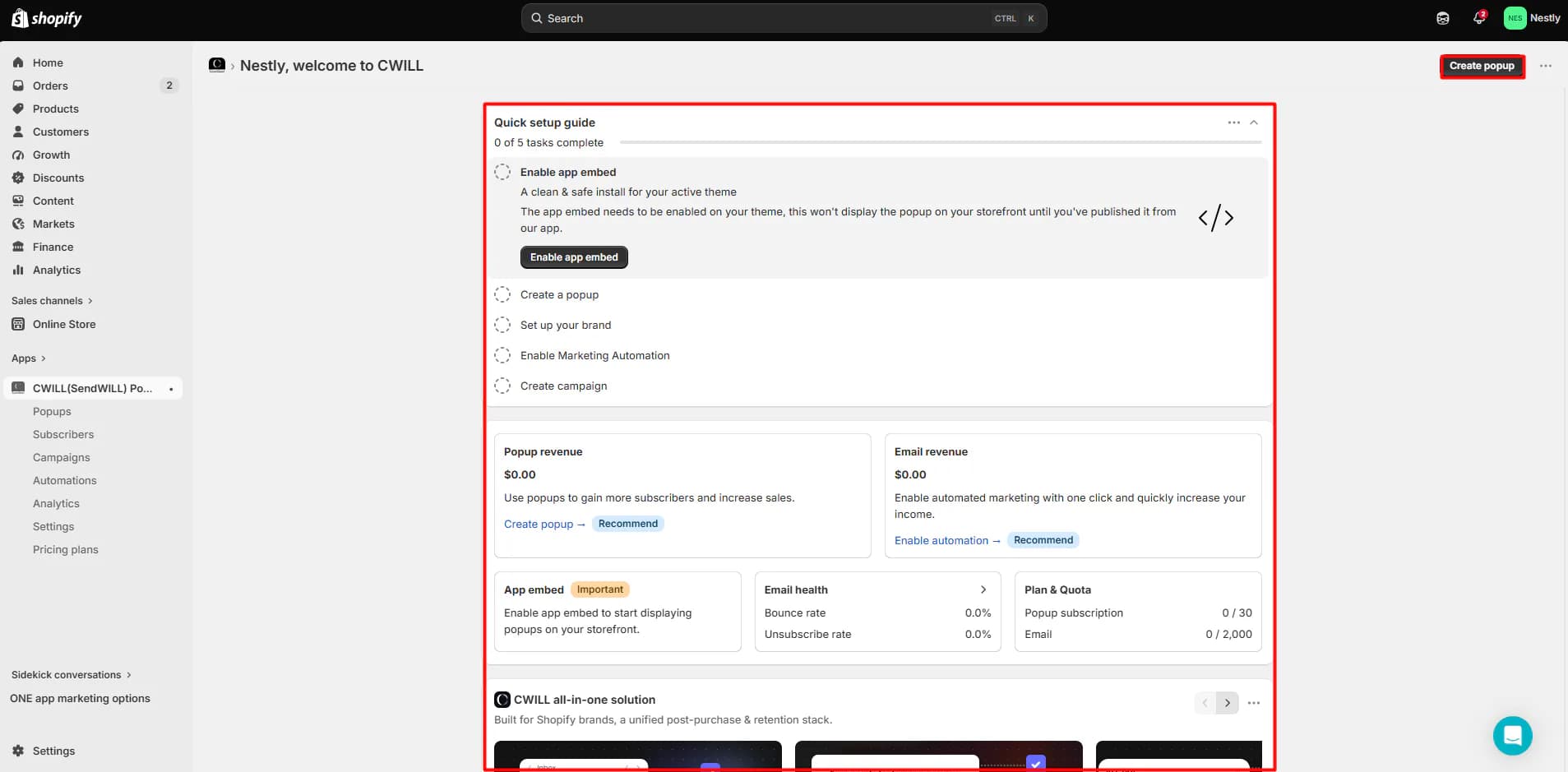
The app opens on a home dashboard with a Quick setup guide. It lists five tasks: enable the app embed, create a popup, set up your brand, enable marketing automation, and create a campaign. The first task comes with a clear warning. The app embed has to be switched on in your theme, and the popup will not appear on your storefront until you publish it from the app. CWILL's help center adds that you must turn the embed on again if you change themes.
Below the guide, the dashboard shows popup revenue, email revenue, email health (bounce and unsubscribe rates), and a Plan & Quota card. On our Free plan, that card read 0 / 30 popup subscribers and 0 / 2,000 emails.
The main menu covers:
- Popups: create and edit signup popups.
- Subscribers: a contact list with filters for email status, SMS status, popup, location, birthday, and subscription date, plus import and export.
- Campaigns: one-off emails, with a daily send limit.
- Automations: preset flows and custom flows.
- Analytics: popup and email performance in one report.
- Settings: email branding, opt-in rules, sending domain, notifications, and UTM tags.
The admin also shows promotions for the developer's other apps. We saw a carousel on the home page and banners for an SEO app and a chatbot app on other pages. You can close the banners, but they do add noise.
What We Tested
We installed CWILL Popup Email Marketing on a Shopify test store and used the Free plan for the whole review. We did not start a paid trial.
We went through the home dashboard, the popup template picker, the opt-in popup editor, the subscriber list, the campaigns page, the email branding editor, the automations page, the flow template library, analytics, settings, and the in-app pricing page.
This was an inspection-based test. We did not enable the app embed, publish a popup to the storefront, collect a test subscriber, send a campaign or test email, or activate an automation. Because of that, this review makes no claims about how the popup looks on a live store, signup rates, email delivery, or revenue. Every count and report in the app showed zero during our session.
Building a Popup
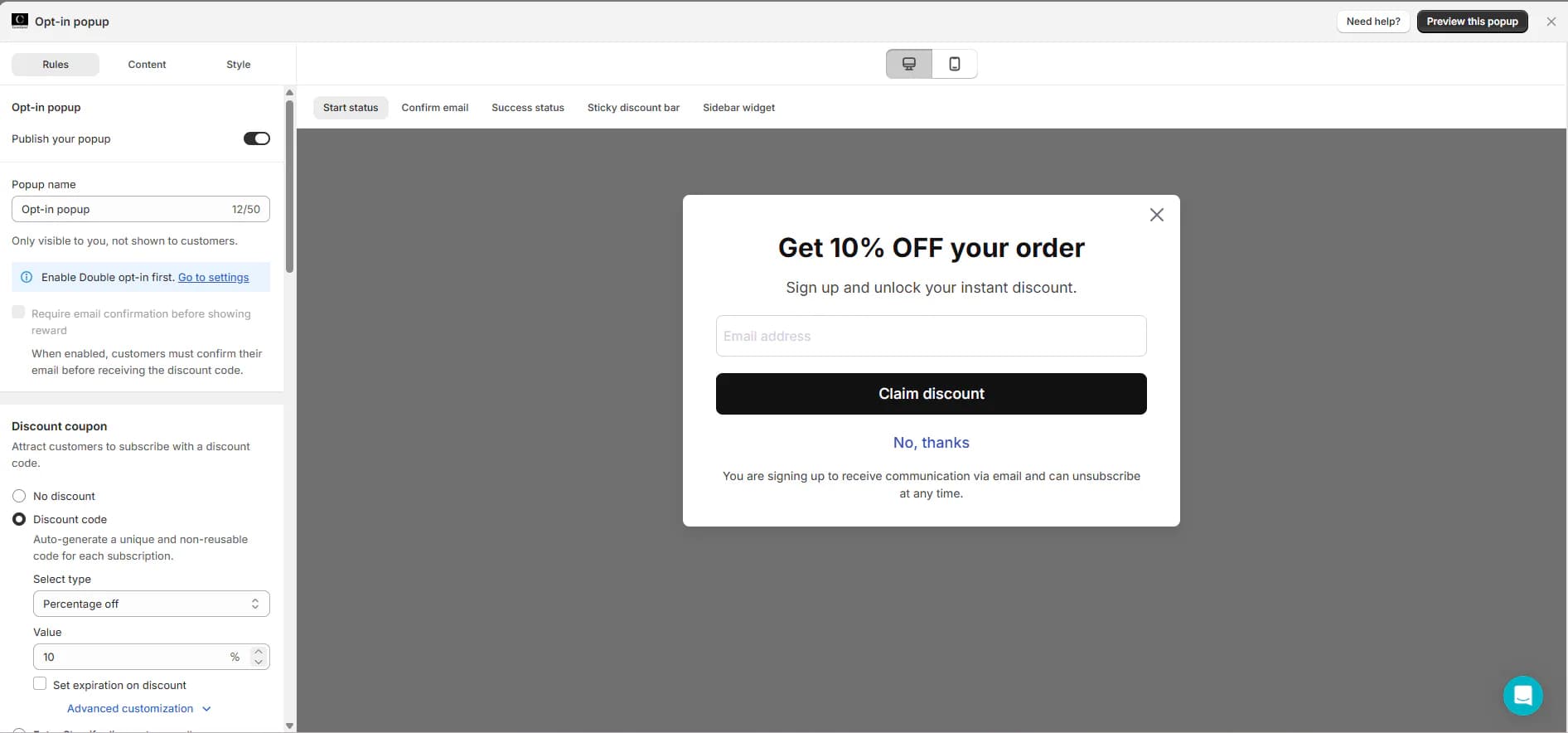
Clicking Create popup opens a template picker. We saw two templates: an Opt-in popup with a "Get 10% OFF your order" offer, and a Spin wheel popup with prizes such as free shipping, 10% off, and 15% off.
We opened the opt-in popup in the editor. It is split into three tabs: Rules, Content, and Style. A live preview sits on the right, with a desktop and mobile toggle. Above the preview, you can switch between the popup's different screens: the start screen, the email confirmation step, the success screen, a sticky discount bar, and a sidebar widget. This makes it easy to see each step a shopper will go through.
The discount settings are the most useful part for a store. You can choose No discount or Discount code. The app says it will "auto-generate a unique and non-reusable code for each subscription." You can set a percentage or other discount type, choose the value, and add an expiration date. The default was 10% off.
One setting caught our attention. The option to require email confirmation before showing the reward was greyed out. A notice above it said to enable double opt-in first in Settings. In Settings, the default was single opt-in, while double opt-in was labelled "recommended." That matters if you worry about fake signups taking discount codes. You need to change the default before you can use that protection.
Branding Your Emails
When we opened Campaigns for the first time, the app asked us to brand our emails before anything else. The branding editor lets you upload a logo, set the logo width, and choose a store name for the email header. You can also pick a web-safe font and set colors for text, buttons, button text, links, and backgrounds. A sample email updates as you change each setting.
The Campaigns page also showed a banner with a daily send limit of 2,000 emails. The app explains that this limit is based on store activity, protects sender reputation, and rises over time. There is a button to request a higher limit.
Emails are sent from a CWILL domain by default. A branded sending domain is locked to the Essential plan and above. Merchants who care about deliverability and brand trust will want that on a paid plan.
Automations: More Than Expected on Free
Automations are where an email app earns its keep. CWILL splits them into two groups.
Preset automations are ready-made flows with fixed triggers. We counted five: Welcome New Subscribers, Unused Discount Reminder, Abandoned Cart Recovery, Thank You for Your Order, and Back in Stock. All five were in Draft status on our store.
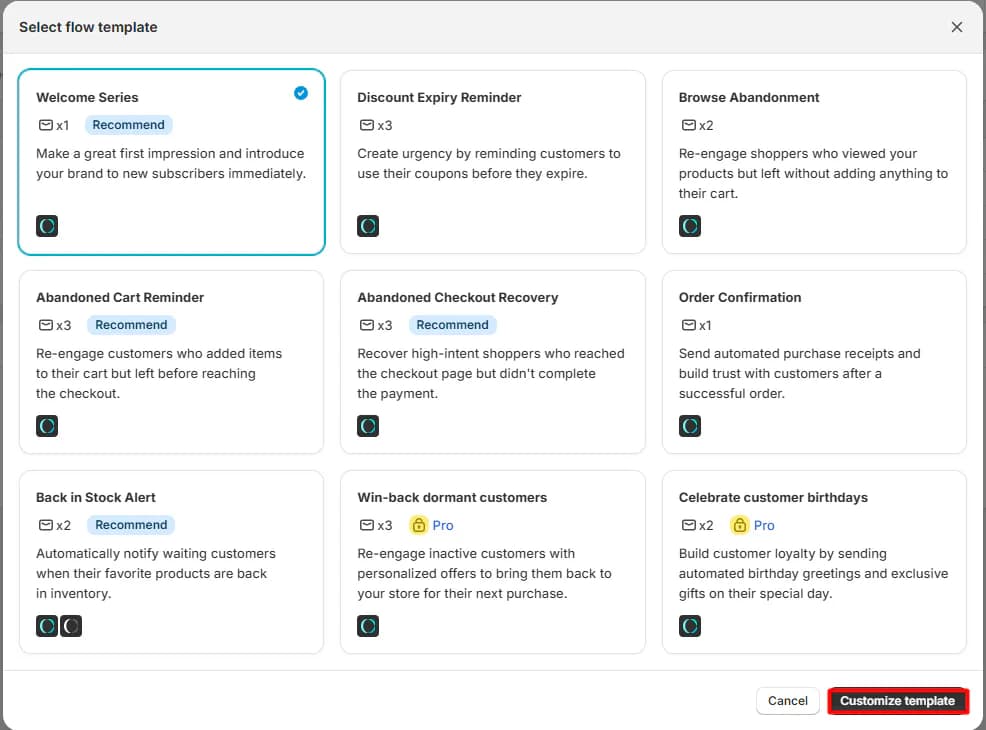
Custom flows let you build your own paths with "advanced logic and branching." The flow template library offered nine templates: Welcome Series, Discount Expiry Reminder, Browse Abandonment, Abandoned Cart Reminder, Abandoned Checkout Recovery, Order Confirmation, Back in Stock Alert, Win-back Dormant Customers, and Celebrate Customer Birthdays. Each card shows how many emails it contains. Only the last two, win-back and birthdays, carried a Pro badge.
This is a point merchants should check for themselves. The Shopify App Store listing places "preset email automations" on the Essential plan and "custom email flows" on Pro. But on our Free plan, the presets and most custom templates were shown without a lock. We did not try to activate a flow, so we cannot confirm whether Free can actually run them. Test this before you plan your email program around the Free plan.
Pricing and Value
CWILL charges by new subscribers and emails sent, not by total contacts. As of October 8, 2026, the Shopify App Store lists these plans:
| Plan | Price | New subscribers / month | Emails / month | Key additions (from the listing) |
|---|---|---|---|---|
| Free | $0 | 30 | 2,000 | Unlimited popup views and stored contacts, 24/7 support |
| Essential | $11.90/month | 150 | 5,000 | Preset email automations, custom sending domain |
| Pro | $29.90/month | 500 | 20,000 | Custom email flows, multi-language email templates |
| Premium | $79.90/month | 2,000 | 60,000 | Custom email flows, customer success support |
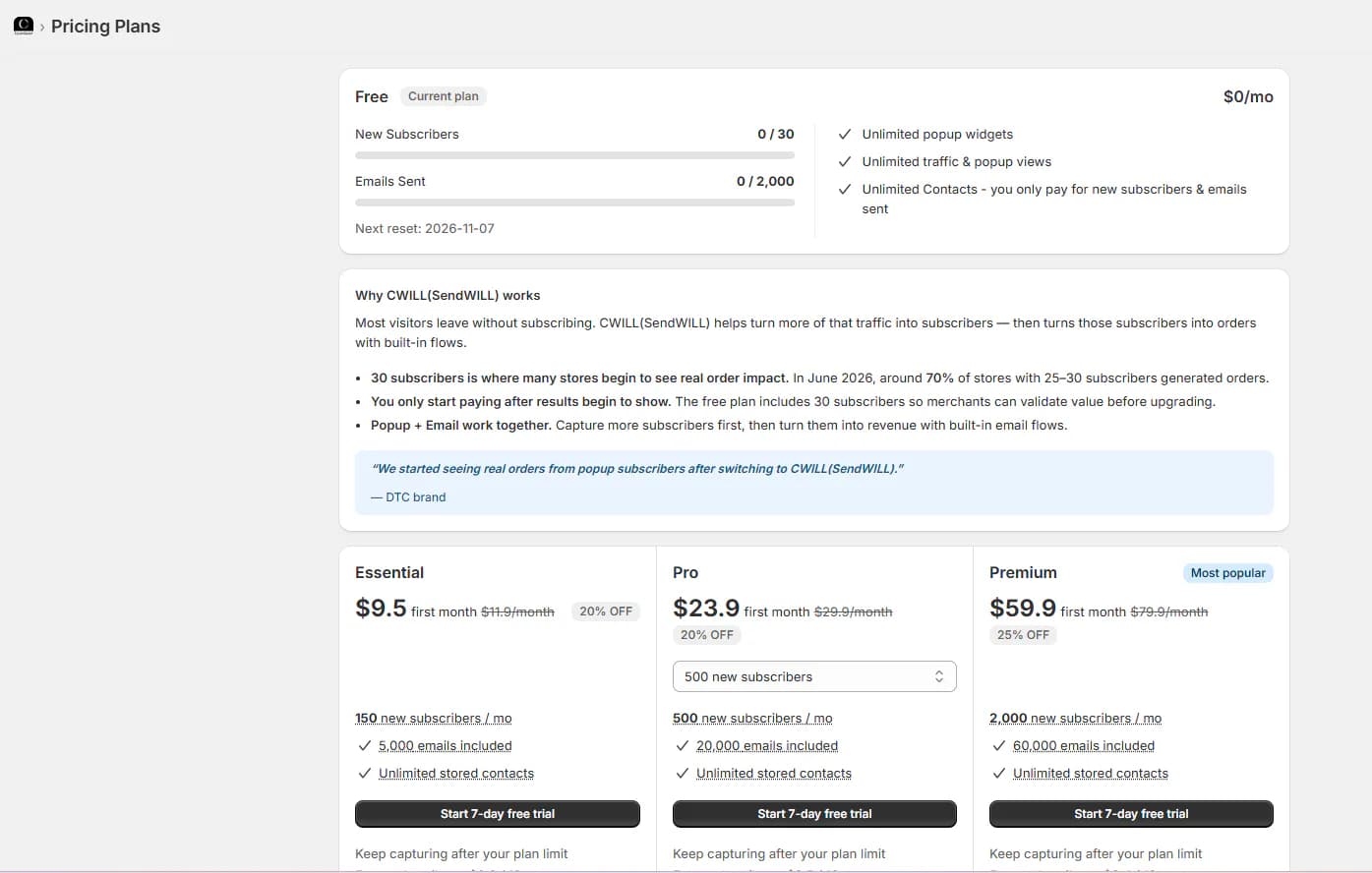
Inside the app, we were offered first-month discounts: Essential at $9.50, Pro at $23.90, and Premium at $59.90 for the first month, before returning to the regular price. The in-app page marked Premium as "Most popular."
Three things matter for budgeting:
- The 30-subscriber cap is small. A store that gains just one subscriber a day would use the whole Free allowance in a month. Our Free quota showed its next reset on November 7, 2026.
- The trial length didn't match. The in-app buttons said "Start 7-day free trial." The Shopify listing says each paid plan has a 14-day free trial. Check which one you are offered before you start.
- Extra charges are possible. The listing says "usage-based charges may apply," and each paid plan in the app mentioned keeping capturing after your plan limit. We could not confirm how those extra charges are calculated.
The in-app pricing page also argues for the model. It says the Free plan's 30 subscribers let merchants "validate value before upgrading." It also claims that in June 2026, around 70% of stores with 25–30 subscribers generated orders. That is the developer's own figure, and we could not verify it.
For value, Essential at $11.90 is a fair entry price for a store that collects up to 150 subscribers a month and wants its own sending domain. Stores growing faster will move to Pro or Premium, and costs rise with signups.
What We Liked
- Popups and email in one place: Signup forms, campaigns, automations, and analytics share one admin and one contact list.
- Clear setup guide: Five tasks show exactly what to do, including the app embed warning.
- Unique discount codes: The popup can create a non-reusable code for each new subscriber.
- Detailed popup preview: You can check every popup screen, on desktop and mobile, before publishing.
- Large flow library: Nine flow templates cover welcome, cart, checkout, browse abandonment, back-in-stock, and more.
- Simple branding editor: One screen sets the logo, fonts, and colors for every email.
What Could Be Better
- Small free subscriber cap: 30 new subscribers a month is enough to test, not to grow.
- Single opt-in by default: Email confirmation before showing a discount needs double opt-in turned on first.
- Mismatched plan details: The trial length and automation limits in the app did not match the Shopify listing on the day we checked.
- Branded domain costs extra: Free plan emails go out from a CWILL domain.
- Cross-promotion in the admin: Banners for the developer's other apps appear on several pages.
What Merchants Say
CWILL Popup Email Marketing has a 4.9-star rating from 7,713 reviews on the Shopify App Store, as of October 8, 2026. About 97% of ratings are five stars.
The most recent five-star reviews often praise the support team, frequently by name, and describe the app as easy to set up. The recent one-star reviews tell a different story. Several from September 2026 say the app moved from free to volume-based paid pricing. Some merchants called it a "bait and switch," and one said they would have to rebuild their email capture from scratch. The developer replied to some of these reviews and offered tailored pricing. Other low ratings from 2026 mention low signup rates and a concern about discount codes being shared online; in reply, the developer said it now binds discount codes to specific customers.
We did not see any billing changes during our test. Still, the pattern is a good reason to read the current plan limits carefully before you rely on the Free plan.
Who Is CWILL Popup Email Marketing Best For?
CWILL is best for small Shopify stores that want a popup and basic email marketing in one simple app. It suits merchants who want discount popups, a few automated emails, and a clean branding setup without connecting separate tools.
It is also a good fit for stores that are ready to pay a modest fee once they start collecting subscribers. Essential at $11.90 a month covers 150 new subscribers and adds a branded sending domain.
Who Should Consider an Alternative?
Stores that expect to collect many subscribers for free should look elsewhere first. CWILL's Free plan stops at 30 new subscribers a month.
Merchants who already use a full email platform may also only need a popup tool, or an email tool with deeper features. If you are comparing options, we have also reviewed Privy, Klaviyo, Mailchimp, tinyEmail, and Seguno.
Final Verdict
CWILL Popup Email Marketing packs a lot into its Free plan. You get popups with unique discount codes, an email branding editor, campaigns, analytics, and a large automation library in one app. The setup guide lays out the first steps clearly.
The limit is the list itself. Thirty new subscribers a month will not last long for a store with real traffic. After that, you pay from $11.90 a month, and the price grows with your signups.
If that model works for you, CWILL is a sensible all-in-one starting point. Install it, turn on double opt-in, build your popup, and check whether the automations you need run on your plan before your list starts to grow.
Frequently Asked Questions
Is CWILL Popup Email Marketing free?
Yes, there is a Free plan. The Shopify listing says it covers 30 new subscribers and 2,000 marketing emails a month, with unlimited popup views and stored contacts. Paid plans start at $11.90 a month.
Are SendWILL, EcomSend, and CWILL the same app?
Yes. The Shopify listing is now titled CWILL Popup Email Marketing and says the app was previously known as EcomSend. The Shopify admin still showed the name "CWILL(SendWILL)" during our test.
What happens when I reach 30 subscribers on the Free plan?
The app tracks new subscribers against your monthly quota, and our quota showed a monthly reset date. The listing says usage-based charges may apply on paid plans. We did not reach the cap, so we could not confirm exactly what happens on the Free plan when you do.
Can I run automations on the Free plan?
We are not sure. The listing places preset automations on Essential and custom flows on Pro. In our Free-plan admin, five preset automations appeared as drafts and only two of nine flow templates showed a Pro badge. We did not activate a flow.
Do I need to enable the app embed?
Yes. The app's setup guide and help center say the popup will not appear on your storefront until the CWILL app embed is turned on in your theme and the popup is published. You need to turn the embed on again if you switch themes.
Did you test signup rates or email revenue?
No. We inspected the admin on the Free plan and did not publish a popup or send any email. All analytics in our test showed zero, so we make no claims about conversion rates, deliverability, or revenue.