tinyEmail Review: A Free, Easy Shopify Email App With a Few Gaps
We tested tinyEmail on a Shopify test store. See what the free plan includes, how its automations work, and which features are still marked coming soon.
11 Min Read

Content Strategist

Most small stores want the same few things from a mail app. They want to grow a list. They want to send news now and then. They want a thank-you note to go out on its own. A cart nudge too. And they do not want to pay much while the list is small.
tinyEmail aims at that store. On the Shopify App Store, it has just one plan. That plan is free. So our question was simple. Can a small store run its mail on tinyEmail for free? And what is missing?
We spent about half an hour in the app on a test store. Our short answer: it is free, and it is easy to use. The basics are there. You get campaigns, templates, forms and flows. But a few things on the listing were "coming soon" in the app. These were SMS, browse abandonment and webhooks.
Key Takeaways
- Free: The listing shows one plan, and it is free.
- Big limits: Its FAQ says there is no cap on subscribers or segments.
- Easy to use: Each main tool sits in the top menu.
- Two ways to build flows: Stock flows, plus a builder for your own.
- Not ready yet: SMS, browse nudges and webhooks said "coming soon".
- Daily sync: The app pulls in your store's contacts once a day.
- Our scope: We looked at each part of the app. We did not send mail or turn on a flow.
Our Verdict
This is a fair free pick for a small store. It works best if you need mail only. It covers the main jobs. You can send news, add sign-up forms and turn on flows. We found it easy to use. And it costs nothing.
The catch is a gap between the listing and the app. The listing names SMS, browse abandonment and webhooks. In the app, all three said "coming soon". Need one of them now? Then this app is not ready for you yet.
We did not send mail or turn on a flow. So we can not check the app's main claim. It says more of your mail will land in the inbox. Treat that as the maker's claim, not our finding.
What tinyEmail Offers
The app is listed as "tinyEmail; Email Marketing". It is made by tinyEmail®, a firm based in Toronto, Canada. It went live on the App Store in December 2021.
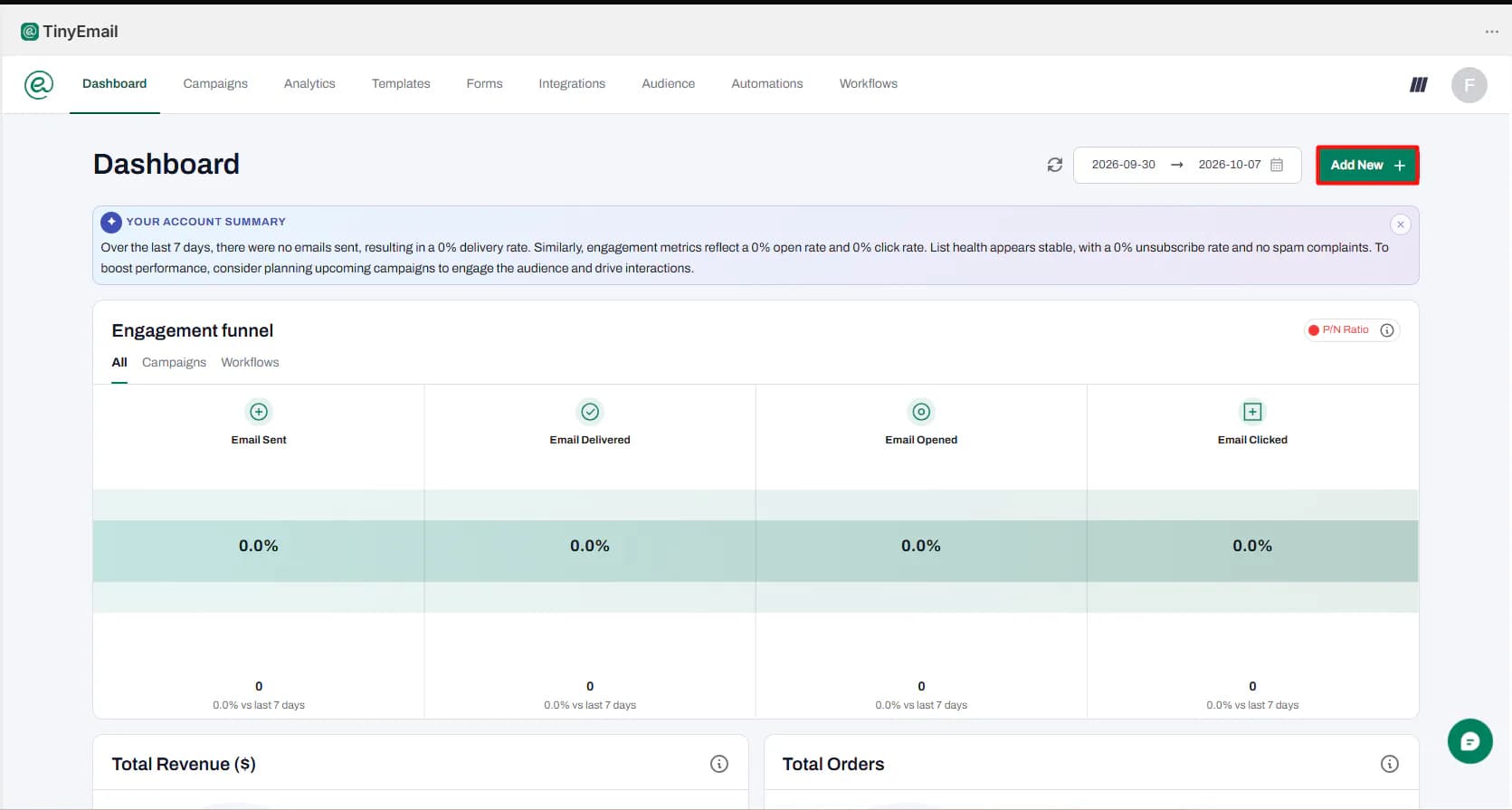
Each main tool sits in one row at the top of the app.
- Dashboard: a short AI note on how your mail is doing. It shows a funnel for mail sent, opened and clicked.
- Campaigns: for one-off mail, with a tab for A/B tests.
- Analytics: for reports.
- Templates: a drag-and-drop gallery and a tab for your own code. We counted 85 "Staff picks" and 66 "Colorful" designs.
- Forms: 37 forms for your pages and 38 popups.
- Integrations: Shopify was linked from the start. Zapier, Pabbly, Magento, WordPress and Volusion were on the list too.
- Audience: your contacts, a block list and segments.
- Automations and Workflows: we cover these below.
The AI note on the dashboard is a nice touch. Our store was new. So it just said no mail had gone out in the last week. Then it told us to plan a campaign.
You will see tinyAlbert on a lot of pages. It is the app's AI helper. It says it can plan your mail, write flow mail and build forms. The banners give a code for a free first month. That tells us it is a paid add-on. We did not try it or check its price.
What We Tested
We put the app on a test store. We spent about half an hour in it, on the free plan.
We went through each main part of the app. We saw the dashboard, campaigns, templates and forms. We saw the links to other apps, the contacts and both flow tools. We opened the campaign editor and the flow builder. We looked at the "Thank You For Purchase" mail.
The app pulled in our store's contacts on its own. The Audience page showed 25 of them. We did not add any.
We did not make or send a campaign. We did not turn on a flow. We did not post a form, talk to support or try tinyAlbert. So we can judge the layout, the setup and the free plan. We can not judge how well mail lands. Nor can we judge how true the sales reports are.
Automations: Stock Flows First
For a small store, flows that run on their own count the most. This app gives you two places to build them.
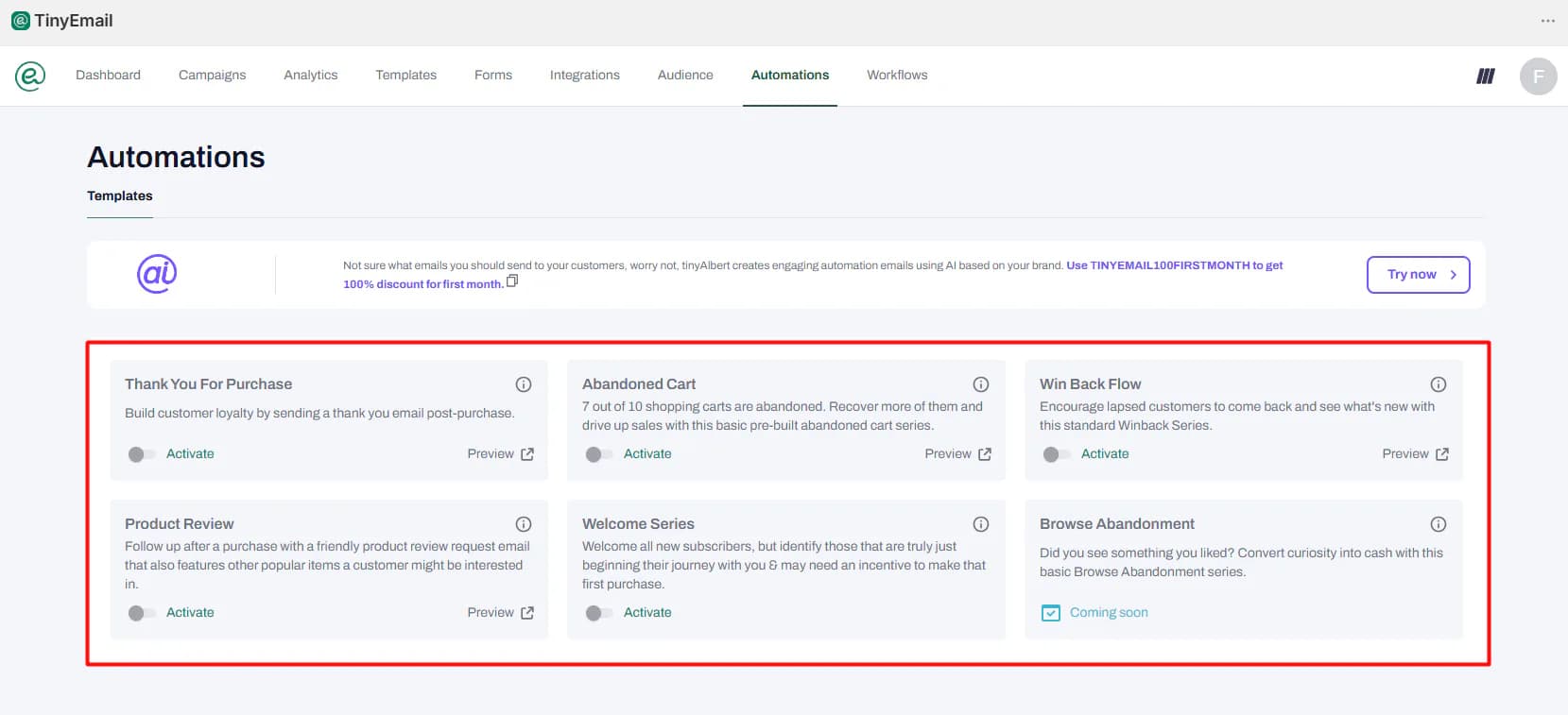
The Automations page is the easy way in. It shows stock flows. Each one has an Activate switch and a Preview link.
- Thank You For Purchase
- Abandoned Cart
- Win Back Flow
- Product Review
- Welcome Series
- Browse Abandonment, marked "Coming soon"
We looked at the Thank You For Purchase mail. It is a plain order note. It has a "View order status" button. It shows the order and the ship-to address. You can view it on desktop and on mobile. It looks plain but neat. It is a good first flow to turn on.
We did not turn any of these on. So we can not say how fast they send. Nor can we say how much of each mail you can edit.
Browse abandonment is the one to watch. It is a nudge to shoppers who looked at items but did not buy. The listing and the FAQ both say it is there. In the app, it said "Coming soon".
Custom Workflows: Flexible, but SMS and Webhooks Are Not Ready
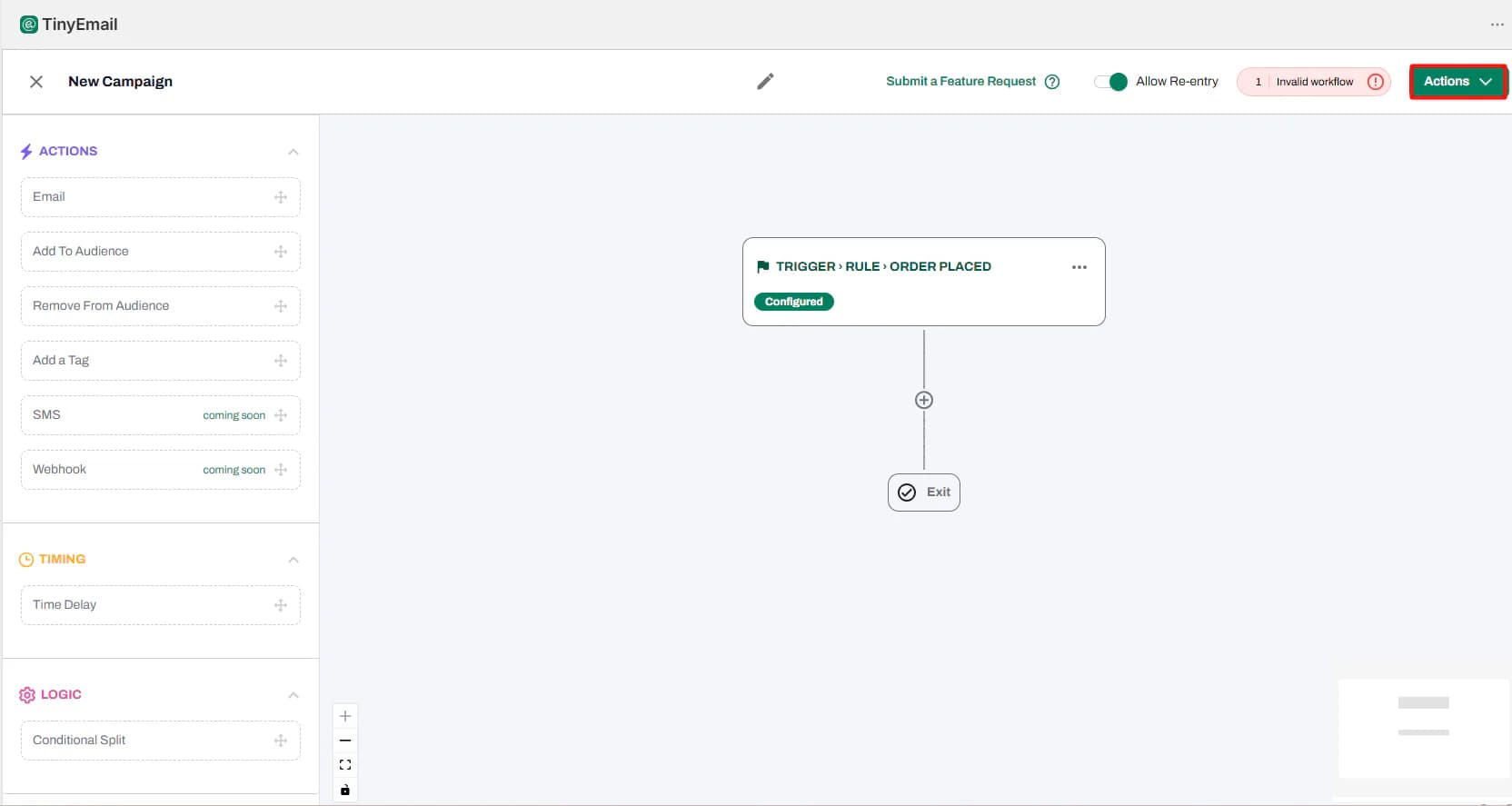
Want more than the stock flows? Use Workflows. Here you build your own flow on a blank page. You start with a trigger, such as Order Placed. Then you drag in steps from the left side.
- Actions: Email, Add To Audience, Remove From Audience, Add a Tag
- Timing: Time Delay
- Logic: Conditional Split
There is an Allow Re-entry switch. It lets a buyer go through the same flow more than once.
The builder checks your work as you go. Our flow had a trigger but no steps. So the app showed a "1 Invalid workflow" note. The flow then sat in the Workflows list as a draft.
Two steps in this panel said "coming soon". They were SMS and Webhook. Campaigns were the same. When you start a campaign, you pick "Email campaign" or "SMS campaign". The SMS card said: "Our next stop is SMS/Text messaging campaigns. Coming soon to tinyEmail."
This is worth a close look. The listing names "SMS notifications" and "APIs and webhooks". In our test, it did mail only. Do you want texts? Do you need webhooks to link flows to your other tools? Then plan on a second app.
Your Store Data Syncs Once a Day
On the Integrations page, Shopify showed as Connected. Just above it, the app says: "Your audience data from integrations is synced every 24hrs at 02:00 AM EST."
The FAQ says store data syncs "periodically". So a new buyer may not show up till the next day. That is fine for news. But keep it in mind if you want new buyers in a segment fast.
We did not test how fast order flows react to a new order.
Pricing and Value
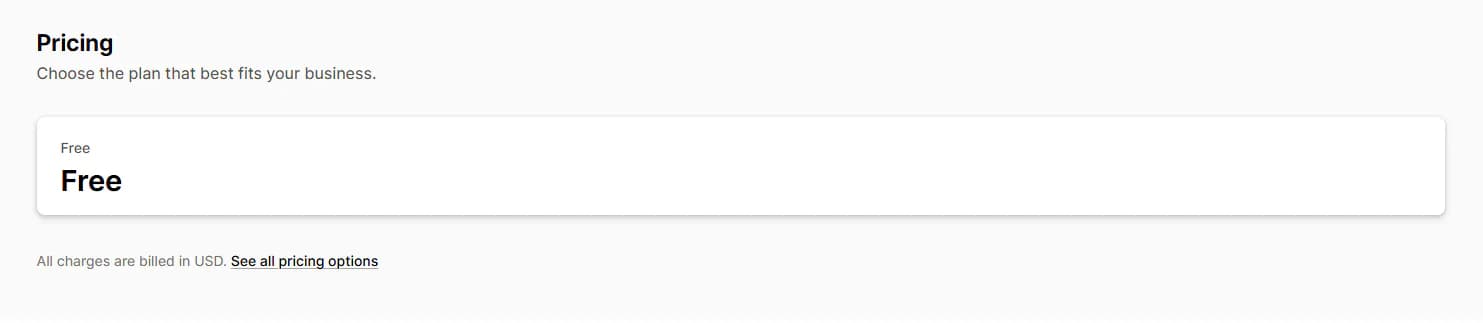
As of 7 October 2026, the App Store lists one plan for this app. It is Free.
The FAQ calls this the "Shopify Pro Plan". It says the plan is free for these stores. It lists three perks.
- unlimited subscribers
- unlimited custom segments
- an AI helper for subject lines
Neither page gives a send limit. We did not send enough mail to find one.
Two more points are worth knowing.
- Sign up through the App Store. Its own site shows paid plans. They start at $65 a month for 15,000 emails. The firm replied to a review in 2024. It said the free plan is for stores that install from the App Store.
- tinyAlbert costs extra. The app pushes it on a lot of pages. The first month is free. We did not check its price.
Our view: a free plan with no cap on your list is hard to beat. That is if you need mail only. You get campaigns, templates, forms and flows. And there is no bill. The real cost question is not price. It is whether you need SMS, browse nudges or webhooks. None of these worked in our test.
What Merchants Say
The app has a 4.3-star rating from 83 reviews on the App Store, as of 7 October 2026. About 81% are five stars. About 10% are one star.
Good reviews from 2025 and 2026 share a few themes.
- Cost: one US store says it moved from Klaviyo for "the affordability and ease of use".
- Support: a lot of stores say replies were quick and kind.
- Simple: one store calls it "simpler compared to mailchimp". It says the app does the basics for free.
Some of these stores had used the app for just minutes or days.
The one-star reviews are mostly from 2024 and 2025. They share a few complaints.
- Install and account trouble: some stores could not install the app. One says it made a new account. It did not link to the old one. The firm replied that an update now lets you link an old account.
- Frozen accounts: one store says its account froze after two days. The firm's reply points to an anti-spam rule. You may only mail contacts who opted in.
- Support and setup: some say support was slow. Some could not verify a sender email. One could not edit its flows.
- Mail after removal: one store took the app off. It says it still got sales mail from the firm.
We did not run into any of this in our short test. Still, two habits help. Only add contacts who opted in. And verify your sender email before your first send.
What We Liked
- Free: one free plan, with no cap on subscribers, says the FAQ.
- Easy to use: clear menus, with each main tool in the top bar.
- Stock flows: five flows you can preview and turn on with one switch.
- Flexible builder: triggers, delays, splits and tags. It warns you when a flow is not done.
- Lots of starting points: plenty of mail designs and over 70 forms and popups.
- Helpful dashboard: a short AI note in plain words.
What Could Be Better
- No SMS yet: SMS campaigns and SMS flow steps said "coming soon". The listing names SMS.
- No browse nudges yet: it said "Coming soon". The listing and FAQ name it.
- No webhooks yet: the Webhook step said "coming soon".
- Daily sync: contacts from your store sync once every 24 hours.
- AI upsell: tinyAlbert banners show up on a lot of pages.
- Mixed reviews: one in ten reviews is one star. They cite install, account and support trouble.
Who Is tinyEmail Best For?
This app fits small stores that want mail only and no monthly bill. That means news, sign-up forms, thank-you notes and cart nudges.
It suits store owners who want to keep things simple. The layout is easy to learn. And you can turn on the flows it gives you. You do not have to build one from scratch.
Who May Want Something Else?
Do you want SMS, browse nudges or webhooks now? Then look at other apps for now. In our test, all three said "coming soon".
Does mail bring in a big share of your sales? Then you may want a longer trial first. Our test could not check the app's inbox claims. We have also reviewed these mail apps: AfterShip Email Marketing, SMS, Seguno, AVADA Email Marketing and Klaviyo.
Final Verdict
The app says it gives stores easy, free mail. From our time in the app, "easy" and "free" hold up. The layout is clear. The plan costs nothing. And the basics are there: campaigns, templates, forms and five stock flows.
The weak spot is the gap between the listing and the app. The listing names SMS, browse nudges and webhooks. The app said all three were "coming soon". Nor could we check its main claim. It says more mail will land in the inbox.
Our advice: if you need mail only, install it from the App Store. Turn on Thank You For Purchase and Abandoned Cart first. Verify your sender email before your first campaign. Need SMS or browse nudges? Check that they have launched before you commit.
FAQ
Is tinyEmail free for Shopify?
Yes. As of 7 October 2026, the App Store lists one plan, and it is free. Its FAQ says there is no cap on subscribers or segments. Its own site lists paid plans. So install from the App Store.
Does tinyEmail have SMS?
Not in our test. SMS campaigns and the SMS flow step both said "coming soon".
Does tinyEmail have abandoned cart emails?
Yes. Abandoned Cart is one of the stock flows, with an Activate switch. We did not turn it on in our test.
Does tinyEmail support browse abandonment?
The listing names it. But in our test, the flow said "Coming soon".
Is tinyEmail easy to use?
We found it easy. Each main tool sits in the top menu. And you can turn on a flow with one switch.
Did you send emails during the review?
No. We looked through the app and opened the editors. We did not send a campaign or turn on a flow. So we can not rate how well mail lands or what it earns.