Junip Product Reviews Review: Does "Unlimited on Free" Hold Up for a Small Shopify Store?
We set up Junip Product Reviews on a Shopify dev store on the Free plan: the seven-step start guide, what Free holds back, and what we could not verify.
13 Min Read

Sr. Product Designer

Most review apps make a small Shopify store choose between a capped free plan and a bill that grows with orders. Junip's pitch is different: unlimited orders and unlimited review requests on every plan, including Free.
That invites an obvious question. If Junip is not charging for volume, what is it holding back on Free?
So the question we tested is practical. Can a small Shopify store get a working, on-brand review setup running on Junip's Free plan without a developer, and what does Free withhold that would push a merchant to the $29 Core plan?
We installed Junip Product Reviews App & AI on a Shopify development store running the Dawn theme, stayed on the Free plan, and completed the seven-step in-app start guide through to a live dashboard and a product page showing Junip's displays. This is a setup-focused evaluation: we did not send a live review request or submit a review, and we say so wherever it matters.
Key Takeaways
- Setup is quick and guided: Install to an active review-request flow took about 12 minutes, all of it inside Junip or a deep link into Shopify's theme editor. Nothing required code.
- Free really is uncapped: Junip's pricing page, the Shopify listing, and the in-app plan screen all state unlimited orders and unlimited requests on Free. The plan boundary is features, not volume.
- The request flow is consent-only by default: Requests send 7 days after fulfilment, and only to customers who agreed to marketing. A safe default that will quietly shrink your request volume if you miss it.
- Free withholds the second-order tools: Follow-up requests, incentives, the product-page media gallery, product groups, and messaging integrations all start at Core or Growth. Support on Free is listed as limited.
- The dedicated reviews page is manual work: Stars and the product widget install with one click each; a storewide reviews page needs a theme template and a Shopify page created by hand.
Our Verdict
Junip's Free plan is a credible starting point for a small Shopify store that wants automated review requests, product-page stars, and a reviews widget without paying for order volume. The start guide made the important decisions visible, the theme install worked through deep links into Shopify's editor, and we did not hit a locked control during setup.
The trade-off is depth rather than volume. Free gives you the collection loop and the core product-page displays. It does not give you follow-up requests, incentives, a media gallery, product grouping, or the marketing integrations a growing brand reaches for next. Junip prices those from $29 a month on Core, and syndication and Klaviyo-style integrations from $79 on Growth.
Start on Free if your order count is small and text-plus-photo reviews on the product page are enough. Before you commit, complete one review from request email to storefront on your own store. We did not, and that is the step that proves the loop.
What Junip Product Reviews Offers
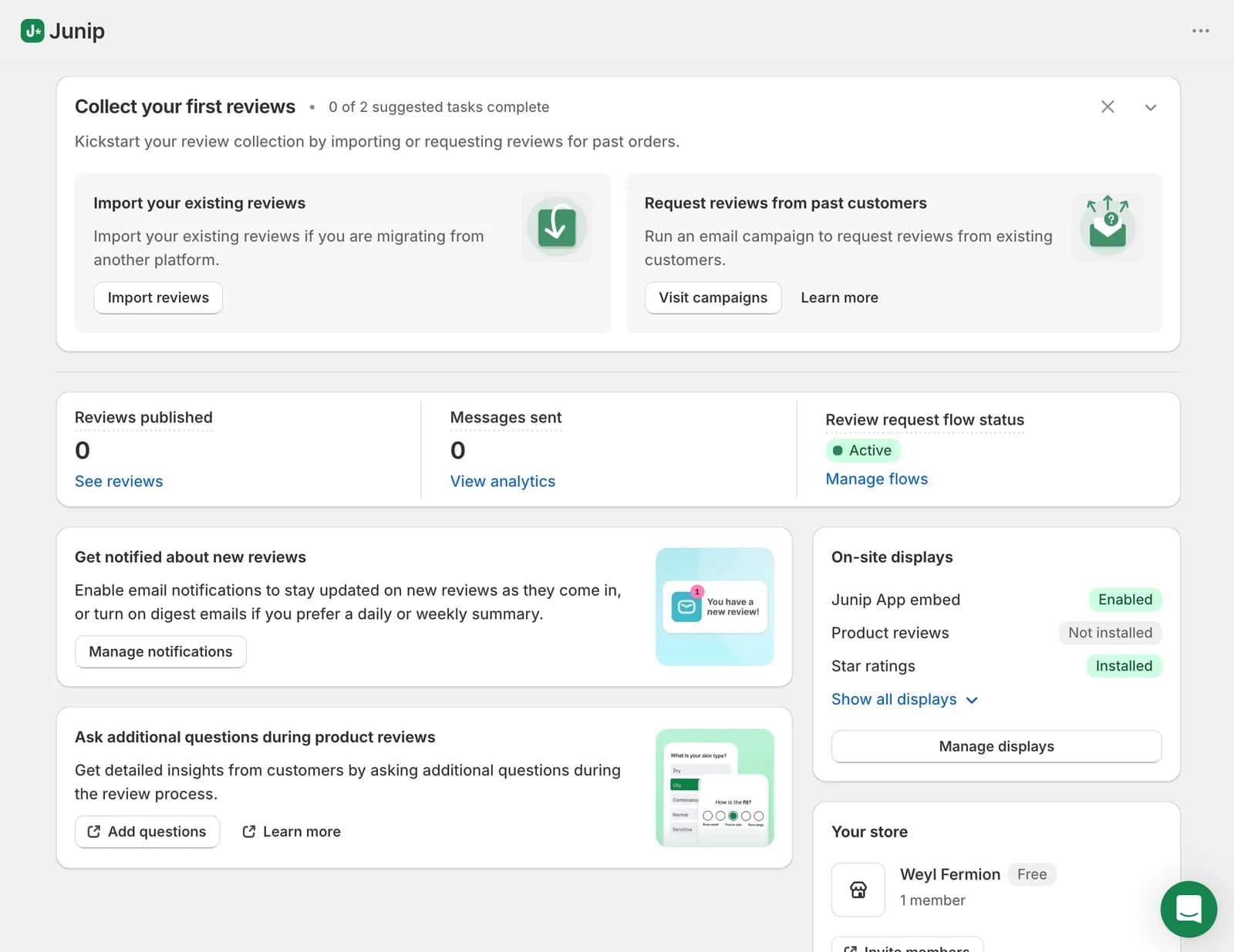
Junip collects product and store reviews through automated post-purchase emails and displays them through a product reviews widget, summary stars, a storewide reviews page, a homepage carousel, a media gallery, and a rating badge. The listing also covers imports and migration, syndication to Google Shopping, Meta Shops, TikTok Shop and the Shop app, and an AI sales agent, with availability depending on the plan.
The app has been on the Shopify App Store since November 2019 and carries the Built for Shopify badge. When we checked on September 22, 2026, it showed a 4.8 rating across 1,156 reviews, with 92% at five stars and three reviews at one star.
The dashboard after onboarding is easy to read. Overview cards report reviews published, messages sent, and the status of the request flow, while an on-site displays card shows which storefront pieces are enabled, installed, or missing.
What We Tested
We installed Junip on a Shopify development store using the Dawn theme and chose the Free plan.
Our hands-on test covered the complete seven-step start guide: the branding step, review-request timing and its marketing-consent setting, enabling the app embed, adding the Product Summary Stars and Product Reviews blocks to the product template, the past-customer campaign step (which we skipped), plan selection, and the dashboard, Displays, and Analytics screens afterwards. We then viewed a product page on the storefront to confirm the stars and the empty reviews section rendered.
This was a setup evaluation. We did not send a review-request email, submit or moderate a review, run a past-customer campaign, import reviews, test incentives or syndication, contact support, or measure page speed. We make no claims about those areas.
For these reasons, this is a Level 2 — Partial Hands-On Test.
Can You Set Up Review Collection Without a Developer?
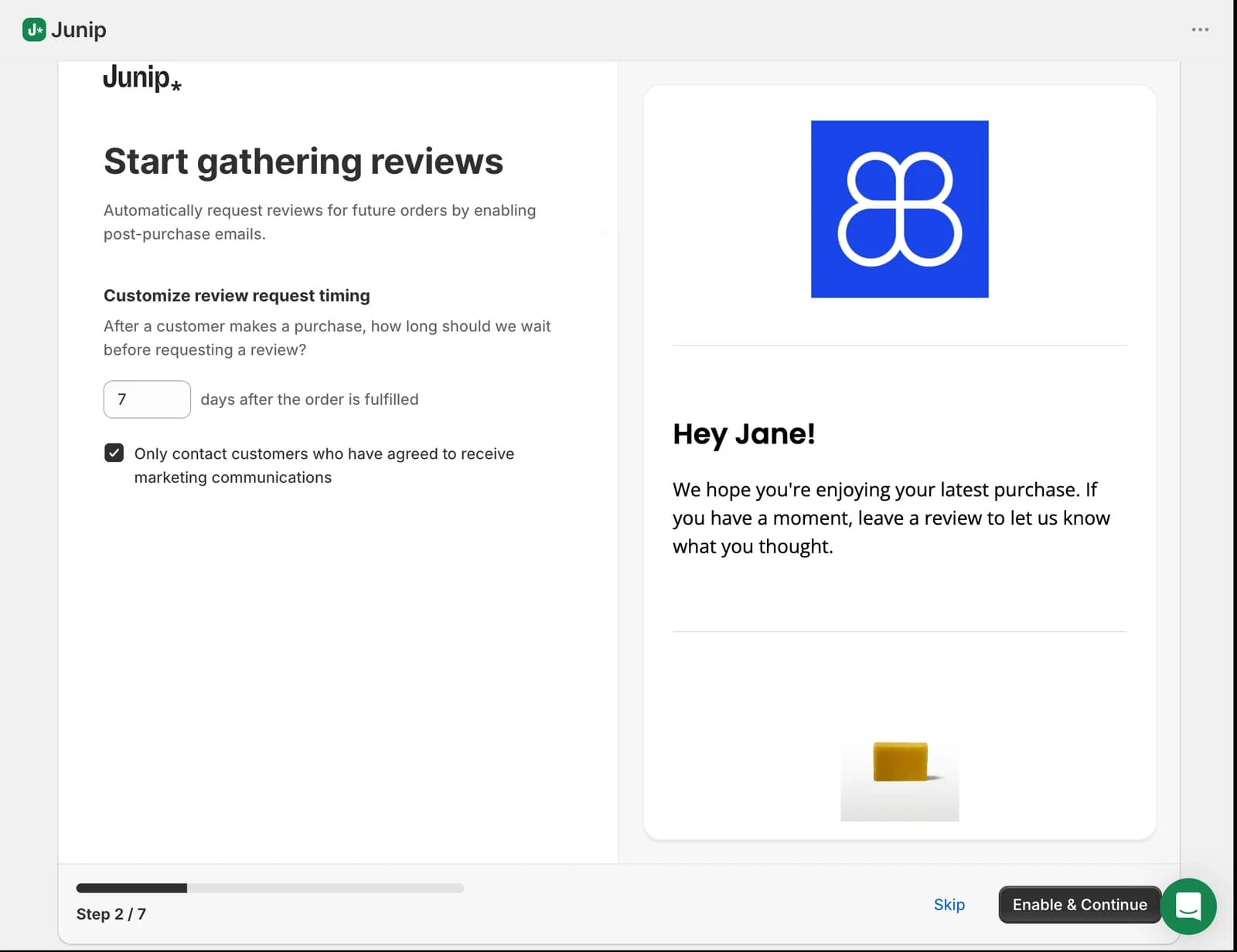
Yes. Everything a first collection loop needs was configured inside the start guide.
Step one is branding: logo, primary colour, button text, star colour and star style, with a live preview showing a rating summary and a Write a review button in our brand colour.
Step two is the decision that matters most. Junip proposes sending a request 7 days after the order is fulfilled, in an editable field. Below it sits a checkbox, ticked by default: only contact customers who have agreed to receive marketing communications.
That default deserves a moment. It is the cautious choice, and for a store that treats review requests as marketing it is the right one. But if a meaningful share of your customers decline marketing at checkout, this one checkbox shrinks your request volume before the first email goes out.
The dashboard afterwards showed the flow as Active with zero messages sent. We did not run an order through the seven-day delay, so delivery, inbox rendering, and the customer-facing review form remain unverified in our test.
Getting Stars and Reviews onto the Product Page
The theme steps are where review apps usually lose non-technical merchants. Junip handled them well.
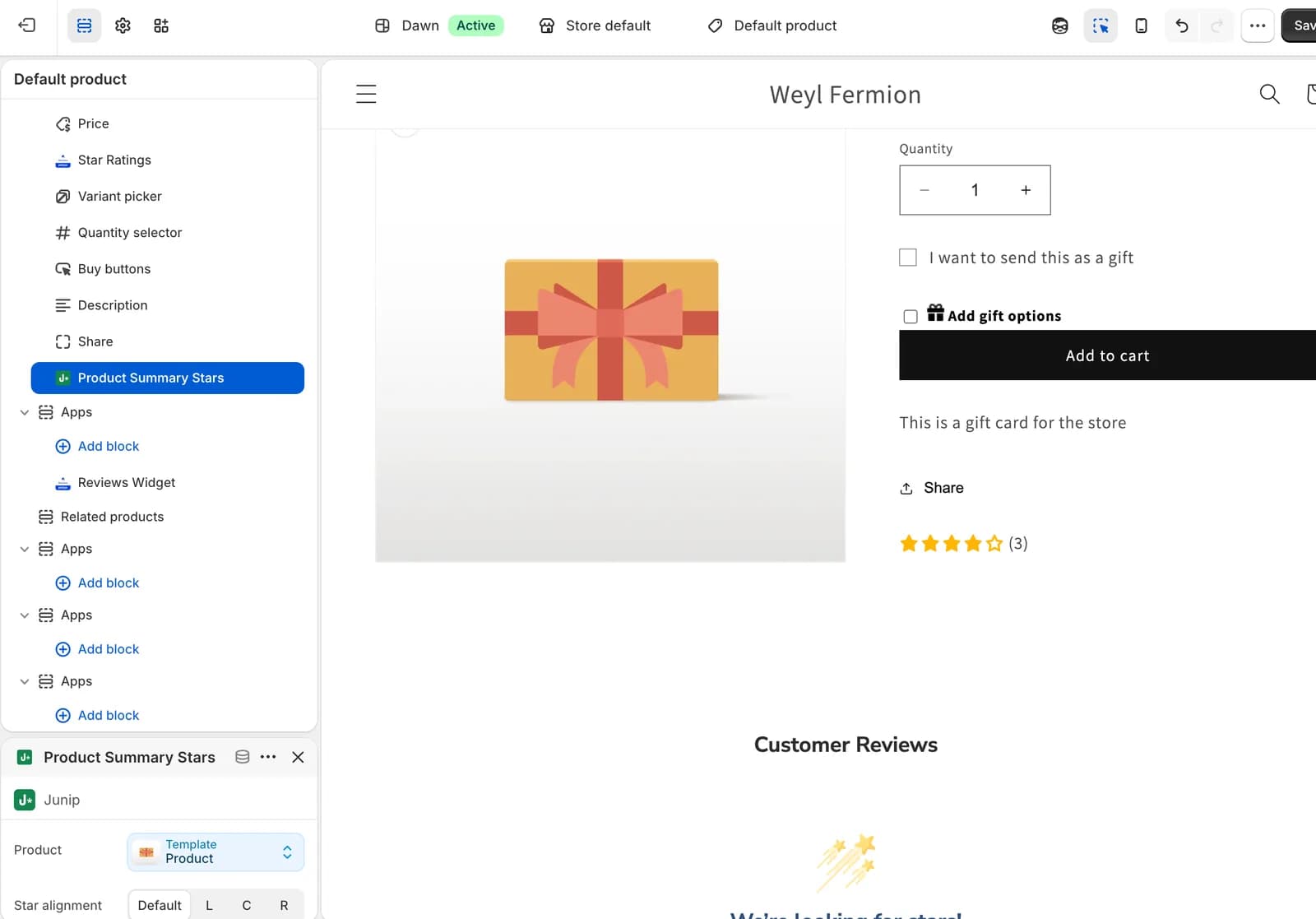
Step three detected that our theme supports sections everywhere and offered an Enable App Embed button that opened the theme editor with the Junip toggle in view. Step four offered Add Product Summary Stars and Add Product Reviews, each deep-linking into the editor with the block ready to place. The stars block appeared under Product information on the default product template and rendered preview stars beside the product details.
On the storefront, the stars rendered on the product page and the reviews section rendered with its empty state, since our store had no reviews yet. The dashboard updated to show both displays as installed.
Two qualifications. Editor changes apply only to the template you edited, so a theme with several product templates needs the steps repeated. And Junip's documentation notes that summary stars on collection pages may need a manual code snippet on some themes, which we did not test.
Where Free Stops Being One-Click
The Displays area lists what else Junip can put on your storefront, and it shows where the guided path ends.
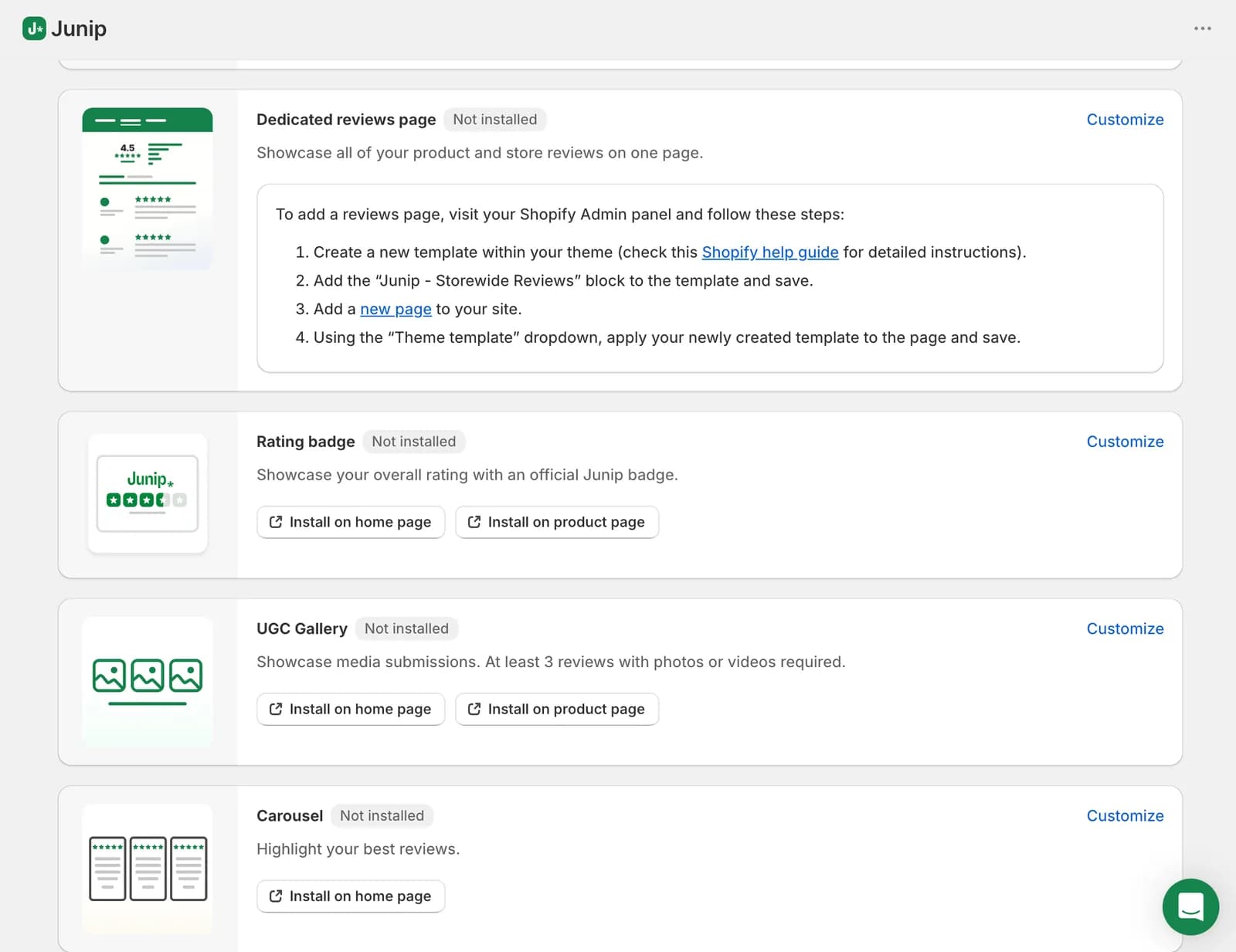
The dedicated reviews page is not a one-click install. Junip's instructions ask you to create a new template within your theme, add the Storewide Reviews block to it, create a page in Shopify, and apply that template to the page. None of it is difficult, but it is four trips between Junip, the theme editor, and the Shopify admin — the kind of step a merchant might assume the start guide had handled. One recent four-star merchant review mentions having to create the reviews page separately, matching what we saw.
The rating badge and carousel offer install buttons. The UGC gallery cannot be installed until the store has three reviews with photos or videos — reasonable, but a new store will not see it for a while.
We did not run into a locked control during the start guide. The feature boundaries below are Junip's published plan rules, not friction we hit.
Moderation: What Junip's Pricing Says and What We Saw
Junip's approach to moderation is worth understanding before you choose it, because it differs from most review apps.
By default, Junip runs what it calls FTC-compliant automatic moderation. Its documentation says this publishes every legitimate review in real time and relies on Junip's own team to catch spam and content that breaches the FTC's review guidelines. Merchants can flag a review, but it is removed only if it meets those guidelines. Any review left pending more than 14 days is approved automatically.
Merchants who want to approve or reject reviews themselves can switch to manual moderation in Settings. Junip's pricing table, however, marks managed moderation as Required on Free and Optional from Core upwards, which would mean a Free store cannot reject a review itself.
In our Free-plan account, the setting appeared changeable rather than locked. We did not switch it or submit a review to see what followed, so we cannot say how self-moderation behaves on Free in practice — only that the published plan table and the settings screen did not obviously agree. If you need to hold reviews before publishing, confirm this in your own account before relying on Free.
Pricing and Value
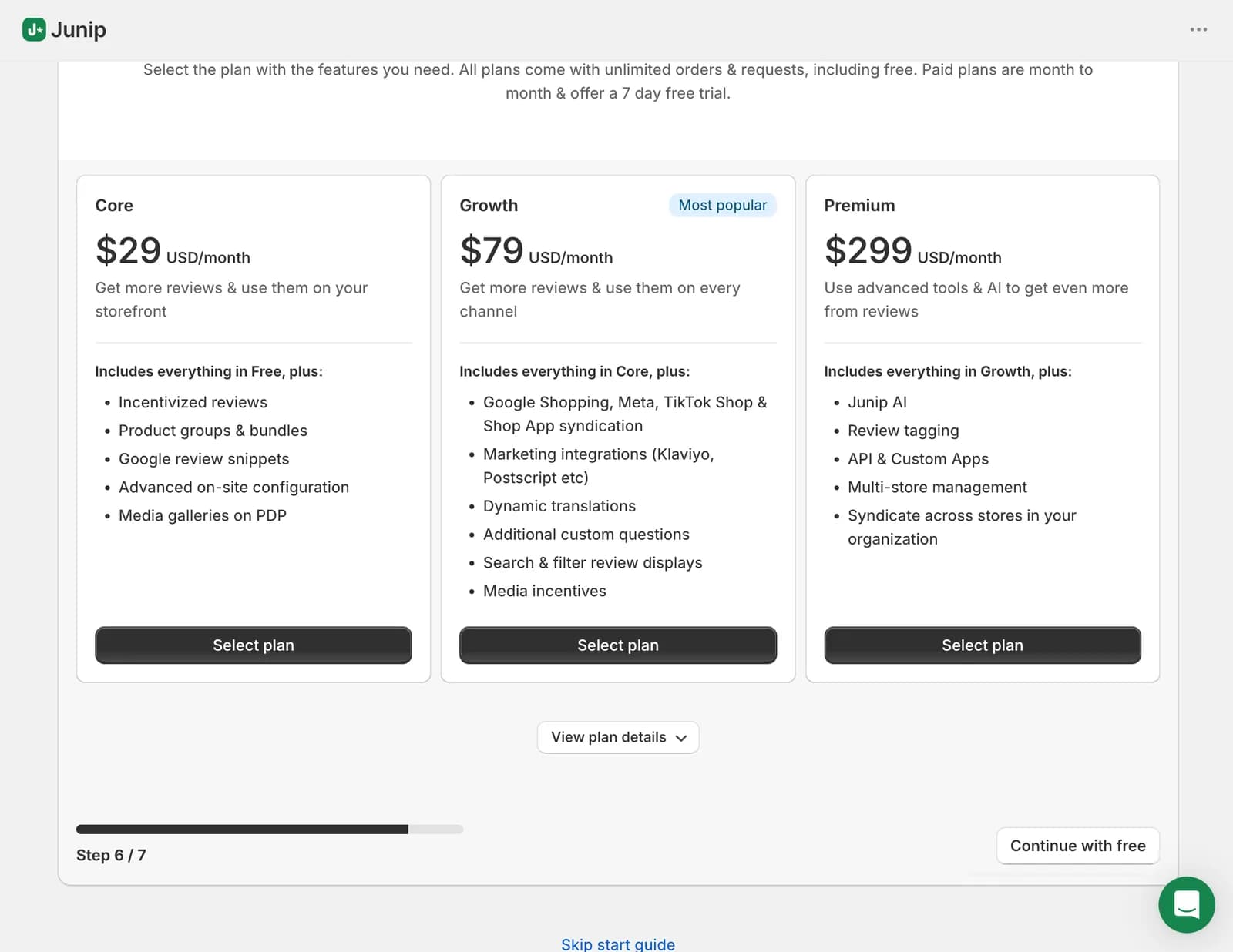
Junip charges a flat monthly fee. There is no order cap and no per-order overage on any plan. These are the official figures on September 22, 2026.
| Plan | Price | What it adds | Who it is for |
|---|---|---|---|
| Free | $0/month | Unlimited orders and requests, product widget, stars, reviews page, carousel, rating badge, photo and video reviews, replies, analytics | The core collection-and-display loop |
| Core | $29/month | Follow-up requests, incentives, product groups and bundles, media gallery on the product page, advanced on-site configuration, optional self-moderation | A second request and more control |
| Growth | $79/month | Google Shopping, Meta, TikTok Shop and Shop app syndication, Klaviyo and Postscript-style integrations, dynamic translations, additional questions, search and filter, pinned reviews | Reviews across channels |
| Premium | $299/month | Junip AI summaries, review tagging, API and custom apps, multi-store management with three stores included, then $99 per extra store | Multi-store setups |
Paid plans carry a 7-day free trial and are billed in USD every 30 days. Free allows two user accounts and one storefront, and lists email and chat support as limited. The AI sales agent on Premium is an additional cost.
The flat price changes the comparison. A store doing 500 orders a month pays $0 on Free or $29 on Core with no volume component — a different shape of cost from an order-based plan, where the same store can pay considerably more as it grows.
One plan detail is inconsistent between Junip's own sources. The listing includes rich snippets on Free; the pricing page lists Google review snippets as a Core feature; the help documentation says snippets appear automatically once Junip's displays are installed, without mentioning a plan. We could not resolve this and did not test it. If Google star ratings matter to you, confirm the requirement before choosing Free.
What Public Sources Add
Our setup evidence is the main basis for this review. On September 22, 2026, we also read Junip's listing, pricing page, help documentation, and a sample of one- to four-star merchant reviews.
The low-rating sample is small, which is itself notable: three one-star and four two-star reviews out of 1,156. Recurring themes in the two- and three-star reviews include the Junip admin slowing or freezing the browser, Google Shopping syndication feeling like a black box with no merchant visibility, limited email customisation, and the admin being English-only. One merchant in a sensitive category reported that reviewer names show as first name and last initial with no option to shorten them; Junip's documentation confirms that rule.
These are sourced patterns from a negative slice, not findings from our test. The four- and five-star reviews commonly praise the clean on-site displays, the lightweight admin, easy setup, and responsive support. Treat broader listing claims such as migration tooling, syndication, and the AI sales agent as developer claims; we did not exercise them.
What We Liked
- The start guide is well sequenced: Branding, request timing, app embed, theme blocks, campaign, plan choice, dashboard. We never had to leave it to work out what came next.
- Theme install works through deep links: Each step opened Shopify's editor at the right panel with the block ready, and the stars rendered on the storefront afterwards.
- No volume anxiety on Free: Unlimited orders and requests are stated consistently across all three official sources. A good month does not cost you requests.
- The plan boundary is visible before you commit: The in-app plan screen shows what Core, Growth, and Premium add, with a plain Continue with free option.
- Photo and video reviews on Free: Some review apps hold visual reviews on a paid tier. Junip's pricing page includes them on Free.
What Could Be Better
- The consent-only default is easy to miss: The checkbox is ticked by default and sits under the timing field, so a merchant clicking through will not realise how many customers it excludes.
- The reviews page is manual: Four steps across three screens, after a guide that made everything else one click.
- Plan rules are stated inconsistently: Moderation is "Required" on Free in the pricing table but appeared changeable in our account, and rich snippets sit on Free in the listing and Core on the pricing page.
- Key workflows remain untested by us: Email delivery, the review form, moderation behaviour, imports, campaigns, incentives, syndication, and support were outside this evaluation.
Who Junip Product Reviews Is Best For
Junip's Free plan suits a small or new Shopify store that expects its order volume to grow and does not want its review app bill to grow with it. A merchant without design or development support can get stars and a reviews widget on the product page in one sitting, and photo and video reviews are included from the start. It also suits stores that expect to want Google Shopping, Meta, or TikTok Shop syndication later, because Growth is a flat $79 rather than a volume-based tier.
Who Should Upgrade or Consider an Alternative
If you need a second request email to customers who ignored the first, or want to offer a discount for reviews, budget for Core from day one. If you need to approve reviews before they publish, confirm how moderation works on Free first. If your team needs more than two logins, or wants live chat rather than limited support, Free will feel thin quickly.
We have separately tested Judge.me, on a flat $0 or $15 structure, Loox, built around photo reviews, and Yotpo, whose pricing scales by orders. Those were separate setup evaluations, not a controlled head-to-head, so we are not ranking them here.
Final Verdict
Junip's Free plan does what it says about volume, and the setup is genuinely quick. A small Shopify store can get automated review requests, product-page stars, and a reviews widget running in about 12 minutes without a developer. The trade-off is depth: Free holds back follow-up requests, incentives, the media gallery, product grouping, and integrations, and its moderation and rich-snippet rules are not stated consistently across Junip's own sources.
- Start on Free if you want unlimited requests without a volume bill and product-page stars and reviews are enough for now.
- Go to Core at $29 when you want a follow-up email, an incentive, or control over what gets published.
- Plan for Growth at $79 if reviews need to reach Google Shopping, Meta, or TikTok Shop.
Whichever you choose, send one real request and follow it through to a published review on your storefront before you tell customers to leave one. That is the step our test did not close, and the one that proves the loop.
Frequently Asked Questions
Is Junip free on Shopify?
Yes. The Free plan costs $0 and, according to Junip's pricing page, includes unlimited orders and review requests, the product reviews widget, summary stars, a storewide reviews page, carousel, rating badge, photo and video reviews, replies, and analytics. We ran our whole test on Free.
How much does Junip cost?
Free is $0, Core $29 a month, Growth $79, and Premium $299, with three stores included on Premium and $99 a month per additional store. Paid plans carry a 7-day free trial. There is no order cap on any plan.
What does the Junip Free plan not include?
According to Junip's pricing page, Free excludes follow-up requests, incentivized reviews, the product-page media gallery, product groups and bundles, advanced on-site configuration, additional questions, pinned reviews, search on the product widget, messaging integrations, and full email and chat support. Free allows two user accounts and one storefront.
Does Junip moderate reviews for you?
By default, yes. Junip's documentation describes automatic moderation that publishes legitimate reviews in real time and removes only content breaching FTC review guidelines. Its pricing table says this managed moderation is required on Free and optional on paid plans. In our Free account the setting appeared changeable, but we did not test it, so confirm the behaviour in your own store.