Okendo Reviews & Loyalty Review: Can a Small Shopify Store Go Live on the Free Plan Without a Developer?
We set up Okendo Reviews & Loyalty on a Shopify dev store on the Free plan: what onboarding covers, why it ends in Preview Mode, and what we did not verify.
14 Min Read

Sr. Product Designer

Okendo is usually described as the reviews platform for brands that have already outgrown the cheaper apps. That leaves a small Shopify store with a practical doubt: is the Free plan a real way in, or a demo you cannot actually launch without paying or hiring someone?
Its Free plan covers up to 50 orders a month, the onboarding runs inside Shopify admin, and the app carries the Built for Shopify badge. So the question we tested is narrow. Can a small Shopify store get Okendo's review widgets live on the Free plan without a developer, and where does Free stop?
We installed Okendo on a Shopify development store, chose self-install, completed onboarding, and activated the Free plan. This is a setup-focused evaluation: we did not send a review request, submit a review, or capture the widget on a product page, and we say so wherever it matters.
Key Takeaways
- Onboarding is honest about what it does not do: Five steps cover installation type, colours, widget instructions, import, and publishing rules — but the widget install is instructions for the theme editor, not something the app does for you.
- Finishing onboarding does not make you live: Okendo's admin was still in Preview Mode afterwards, with a banner saying widgets will not display reviews until a billing plan is selected. Choosing Free on the Plan page cleared it.
- Done-for-you installation is a Growth benefit: Okendo offers to install the widgets for you, but only on Growth ($119 a month) and above.
- Auto-publish has a 14-day catch: Reviews blocked by the star-rating or sentiment rules still publish automatically after 14 days unless you contact support to opt out.
- Price it at your volume: Free is 50 orders, Essential is $19 for 200, and the next step is Growth at $119 for 1,500.
Our Verdict
Okendo's Free plan is a credible starting point for a small store that can handle a theme-editor install and wants a reviews app it will not need to migrate away from later. The onboarding is clear, the colour setup needs no CSS, and the moderation defaults are conservative.
The two things to know in advance are both about the gap between setup and launch: widget installation is documented rather than automated on Free, and completing onboarding still leaves the app in Preview Mode until you choose a plan in Settings. Neither is hard once you know, but neither is obvious from the progress bar. Start on Free if your monthly orders are comfortably under 50 and you can enable the App Embed and add two app blocks yourself — then confirm the widget on your own product page and send yourself a test request before you tell customers to leave reviews. We did not close either of those loops, and they are the steps that prove the setup.
What Okendo Reviews & Loyalty Offers
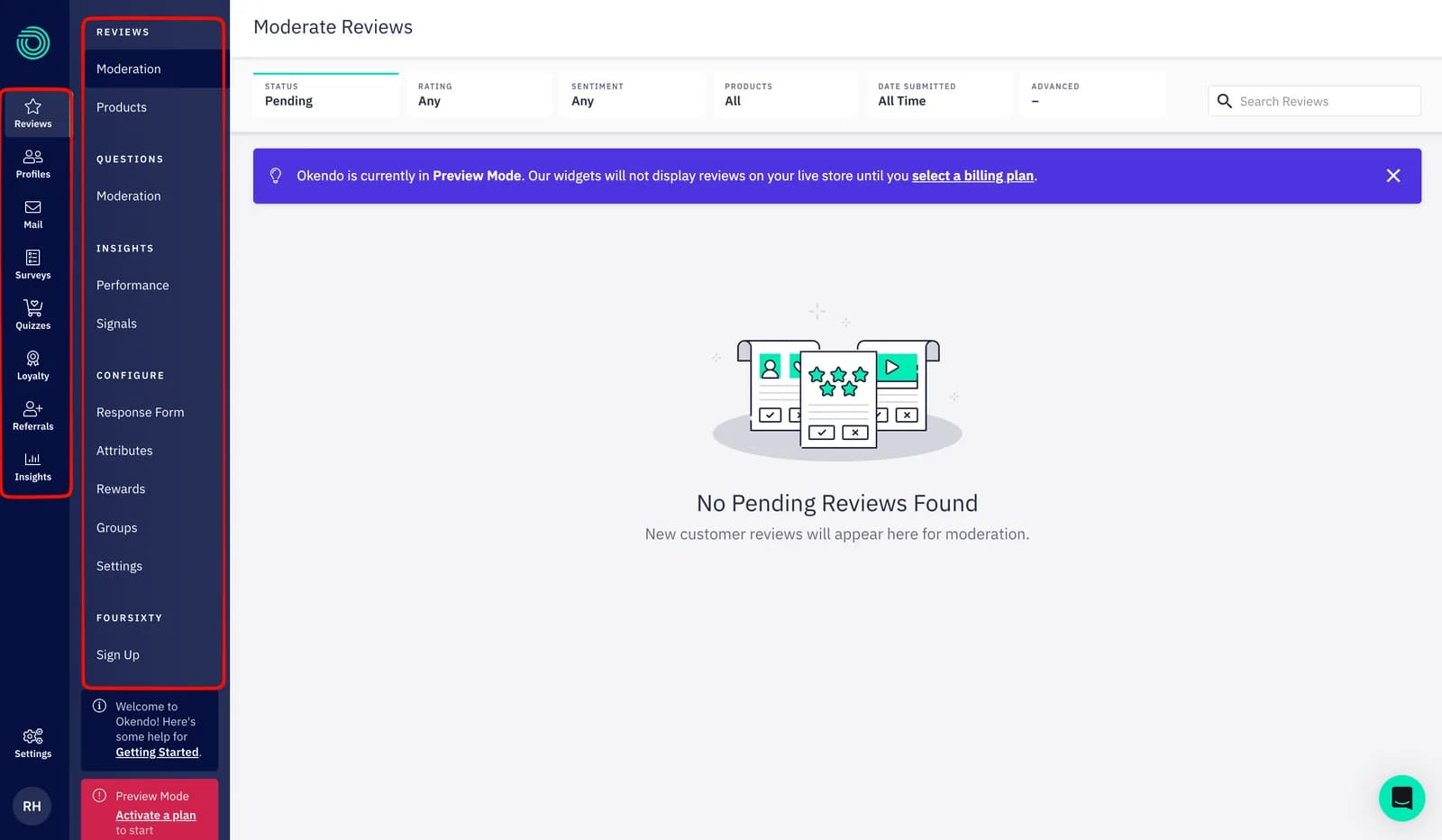
Okendo collects product reviews through automated post-purchase emails and displays them in on-site widgets, star ratings, carousels, and media galleries. The same app also contains Loyalty, Referrals, Surveys, and Quizzes; we evaluated the Reviews product only.
The app has been on the Shopify App Store since June 2018 and carries the Built for Shopify badge. When we checked on September 22, 2026, it showed a 4.8 rating across 1,424 reviews, with 95% at five stars and 2% at one star.
Okendo runs in two places. Onboarding lives inside Shopify admin; day-to-day work happens in Okendo's own admin, a separate interface covering moderation, products, questions, performance, and configuration. That admin is also where the plan boundary shows itself: when we first opened it after onboarding, a banner read Preview Mode, and a red card prompted us to activate a plan to start displaying reviews.
What We Tested
We installed Okendo on a Shopify development store, chose Self-install as the installation type, and activated the Free plan.
Our hands-on test covered the five-step onboarding (installation type, colours, widget install instructions, review import, publishing rules), enabling the App Embed and adding the Star Snippet and Reviews Widget blocks in the theme editor, the Okendo admin afterwards including the Moderate Reviews queue and the Plan page, and activating Free from Settings.
This was a setup evaluation. We did not send or receive a review-request email, submit a customer review, moderate a real review, import a review file, or capture the rendered widget on a product page. We did not test Loyalty, Referrals, Surveys, Quizzes, Google snippets, integrations, support, or page speed. We do not make claims about those areas. For these reasons, this is a Level 2 — Partial Hands-On Test.
Who Installs the Widgets Depends on Your Plan
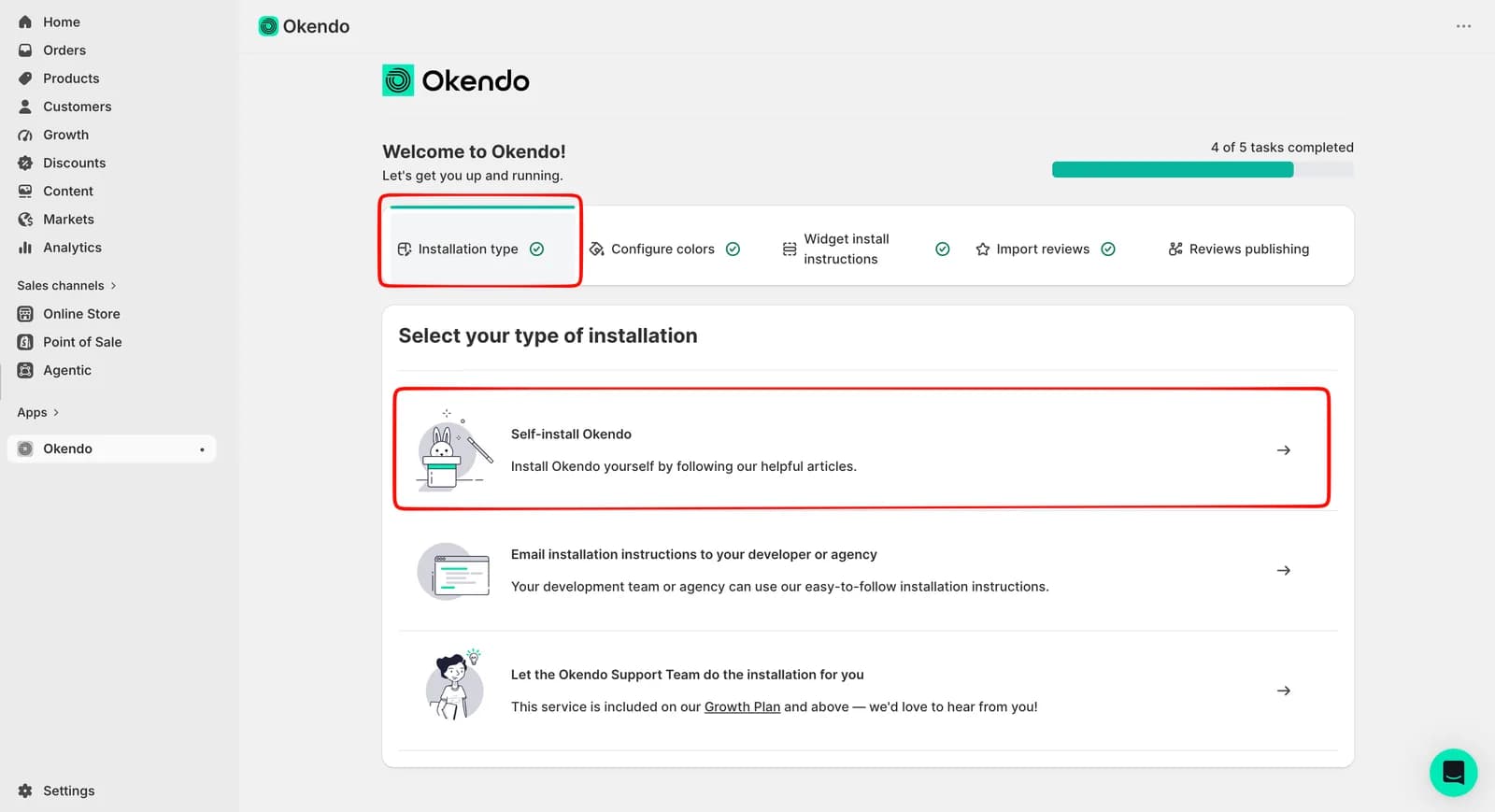
Okendo's first question is not about colours or email. It asks who will do the installation. Three paths are offered: self-install by following the help articles, email the instructions to your developer or agency, or let the Okendo Support Team do the installation for you. The third option states on screen that the service is included on the Growth Plan and above.
That is a plan boundary presented as a convenience, and it deserves a moment before you click. Growth is $119 a month, so a Free or Essential merchant who wants the widgets installed for them either pays for Growth, pays their own developer, or does it themselves. We chose self-install, the path most small stores will take. The framing is at least honest: Okendo tells you on step one that the install is yours, rather than promising one click and leaving the theme-editor work to be discovered later.
Widget Installation Is Instructions, Not Automation
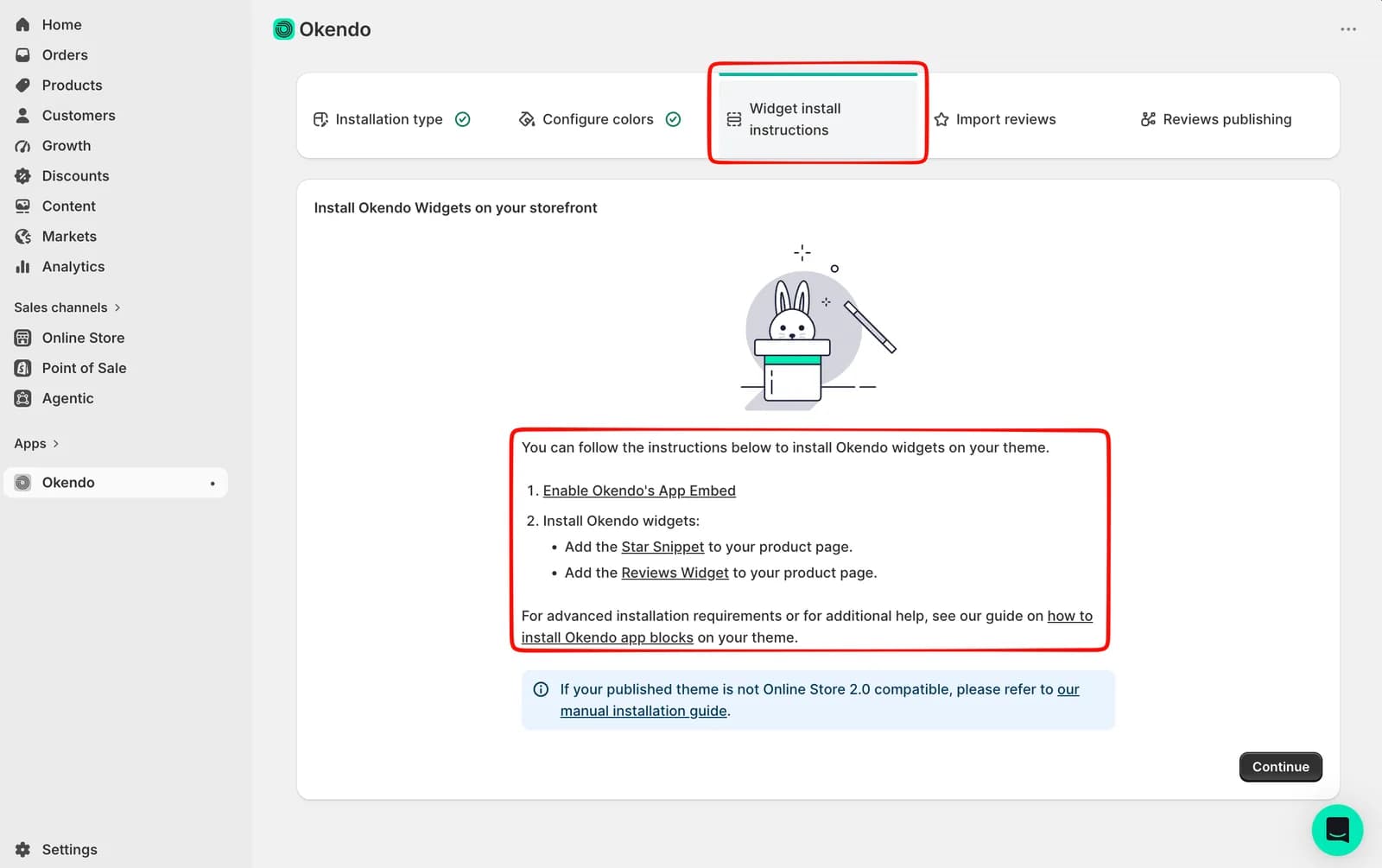
Step three is titled Widget install instructions, and the title is accurate. There is no install button. The screen lists two tasks — enable Okendo's App Embed, then add the Star Snippet and the Reviews Widget to your product page — each linking to a help article, with a note that themes not built on Online Store 2.0 need the manual guide instead.
In our test we enabled the App Embed and added both blocks through the theme editor — the standard Online Store 2.0 pattern, with no theme code involved. Okendo's documentation carries a warning that matters here: if the App Embed is not enabled, the widgets will not appear at all, even when the blocks are added. Do the steps in the order shown.
What we did not do is capture the result on a product page, so this review makes no claim about how the widget renders or whether demo content appears before activation. Treat the storefront check as your job before launch, and treat the Continue button as a statement that you have read the instructions, not that the install has been verified.
Between steps one and three sits the colour step: three colours, an auto-generated palette, and a live preview of the widget beside the form. It required no CSS. We did not test the Custom CSS entry in Okendo's settings.
Moderation Defaults and the 14-Day Rule
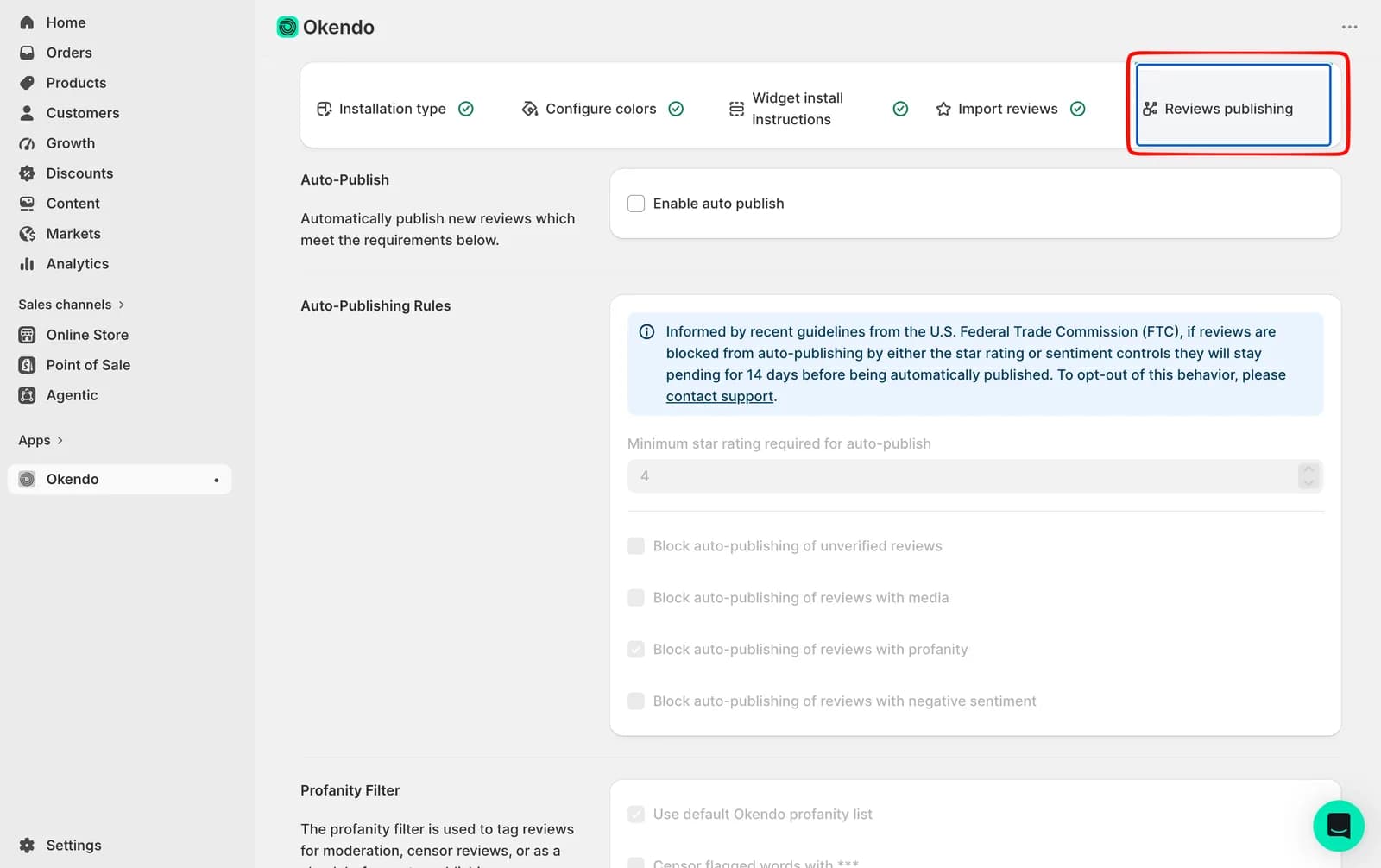
The last onboarding step is the one most merchants will skim, and it is the one we would slow down on. Auto-publish is off by default, so every review waits in the moderation queue until you approve it. Turn it on and Okendo publishes according to rules: a minimum star rating, which defaulted to 4 in our session, plus optional blocks for unverified reviews, reviews with media, reviews with profanity, and reviews with negative sentiment. The profanity block was pre-ticked; the others were not.
The important line sits above those rules. Okendo states that, informed by FTC guidelines, any review blocked from auto-publishing by the star-rating or sentiment controls will stay pending for 14 days and then publish automatically. To opt out, you contact support. Okendo's help documentation says the same and adds that merchants cannot edit review content, only approve or reject it.
That changes what the minimum-rating rule means. It is not a filter that keeps three-star reviews off your page; it is a two-week delay before they appear, unless you reject each one by hand or ask support to change the behaviour. Plan your moderation routine around that. We did not receive a real review during this test, so the queue, the timer, and the reject action were not exercised.
Pricing and Value
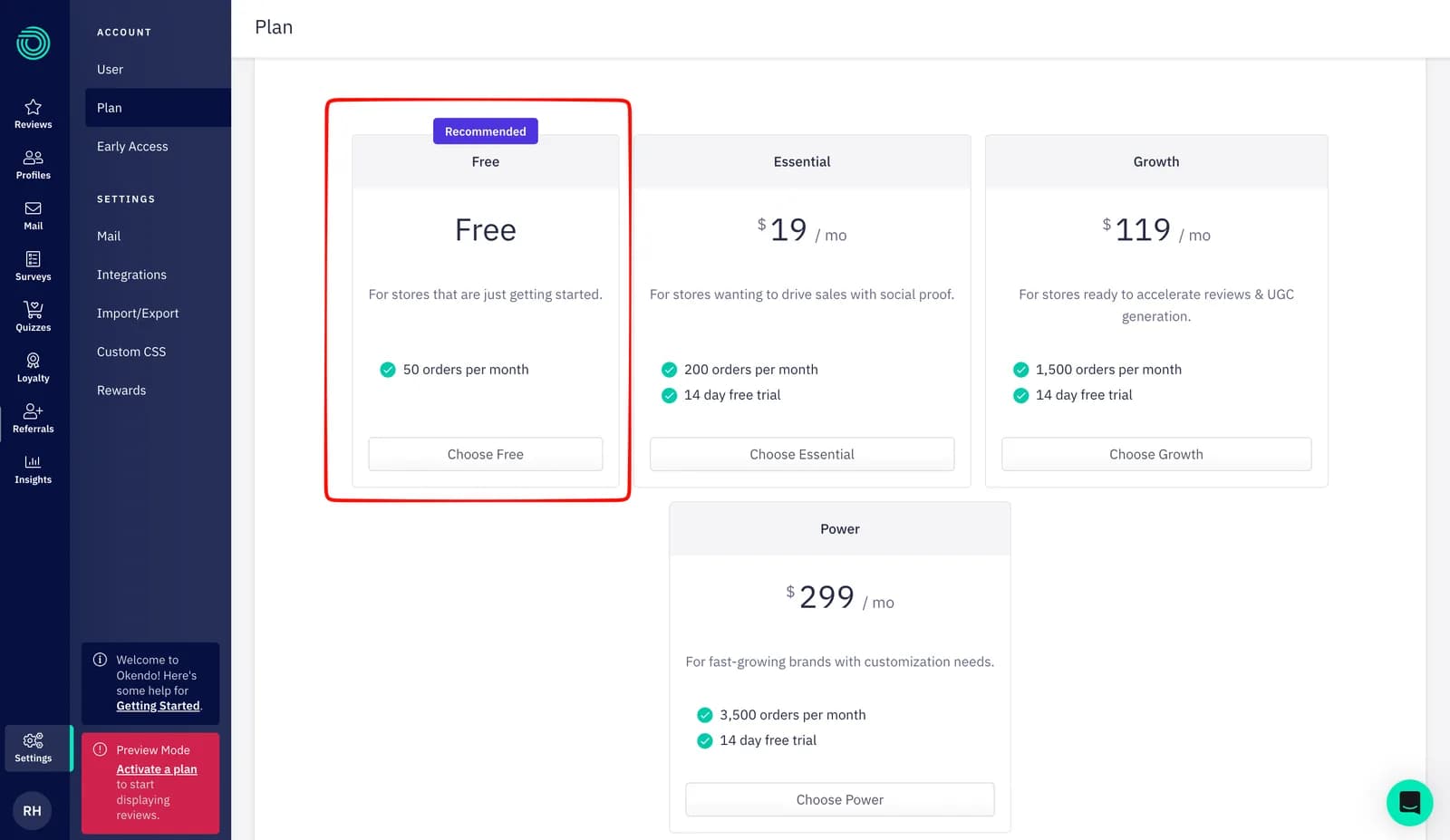
Okendo prices Reviews by monthly order volume. These are the figures on the Shopify listing and the in-app Plan page on September 22, 2026.
| Plan | Price | Order limit | What the listing adds |
|---|---|---|---|
| Free | $0/month | Up to 50 orders/month | Automated review request emails, smart review form, review rewards engine, review displays, Google SEO snippets, review grouping, moderation |
| Essential | $19/month or $204/year | Up to 200 orders/month | Everything in Free; 14-day trial |
| Growth | $119/month or $1,308/year | Up to 1,500 orders/month | AI review summaries and keywords, TikTok Shop, Q&A widget, and the done-for-you installation |
| Power | $299/month or $3,288/year | Up to 3,500 orders/month | Review campaigns, advanced CSS editor, email and SMS integrations, advanced reporting, managed onboarding |
Charges are billed every 30 days in USD. Okendo's pricing page adds that a store passing its order limit can buy a one-off top-up of order credits instead of upgrading, but does not publish the price — check it in your account before you rely on it.
The shape of the ladder matters more than the entry price. Free to Essential is a small step: $19 buys four times the orders. Essential to Growth is not — a store doing 300 orders has outgrown Essential's 200, and the next plan is $119. That is the gap where a merchant should compare top-up pricing against a flat-price alternative.
Now the part the pricing page does not show you. Onboarding finished, and Okendo's admin opened in Preview Mode, with the same prompt on the Plan page. We went to Settings, chose Free, and the banner disappeared. That sequence is the single most useful thing we learned. The Free plan is real and it does clear Preview Mode, but the five-step onboarding does not select it for you. A merchant who completes the checklist, watches the progress bar fill, and moves on could reasonably believe they are live when they are not.
Before relying on Free, we would check three things in your own account: that the Plan page no longer shows Preview Mode, that the Star Snippet and Reviews Widget are visible on a product page, and what a top-up costs if your orders spike past 50.
What Public Sources Add
Our setup evidence is the main basis for this review. On September 22, 2026, we also read Okendo's Shopify listing and pricing page, its help articles on plan activation, installation, and FTC-related moderation changes, and a sample of the newest and lowest-rated merchant reviews.
The newest reviews are dominated by praise for named support staff, smooth onboarding on higher tiers, the look of the widget, and star ratings appearing in Google results. The one- to three-star reviews from 2026 cluster around support limited to documentation on lower plans, review-request emails that did not start sending for weeks, star ratings not appearing on the storefront, leftover metafields that blocked Shopify's duplicate-product feature, and unresolved loyalty bugs. These are sourced patterns from a small negative slice of a 4.8-rated app, not findings from our test. The support pattern is worth weighing against the Growth-gated installation service on step one: the hands-on help arrives with the paid tiers. Treat the listing's broader claims, such as AI summaries and the loyalty products, as developer claims we did not exercise.
What We Liked
- The install path is declared on step one: Self-install, hand it to a developer, or have Okendo do it on Growth. There is no surprise theme-editor work at the end.
- Colour setup needs no CSS: Three colours, an auto-generated palette, and a live widget preview beside the form.
- Moderation defaults are conservative: Auto-publish is off, the profanity block is on, and the 14-day rule is written on the settings screen rather than buried in a policy page.
- The Free plan is a real plan: It is marked Recommended, carries no trial timer, and choosing it ended Preview Mode in our test.
What Could Be Better
- Onboarding ends short of live: The progress bar reaches its end while the app is still in Preview Mode. A final step that selects a plan would remove the gap.
- Widget installation is manual on Free and Essential: The App Embed plus two app blocks is a modest job, but Okendo's own alternative is a $119 plan.
- Auto-publish rules are softer than they look: A minimum star rating delays lower-rated reviews by 14 days rather than filtering them, and opting out requires contacting support.
- Top-up pricing is not published, and key workflows remain untested by us: storefront rendering, review-request delivery, review submission, imports, and support were all outside this evaluation.
Who Okendo Reviews & Loyalty Is Best For
Okendo's Free plan suits a small or new Shopify store with modest monthly orders that is comfortable enabling an App Embed and adding two blocks in the theme editor. It also suits a store that expects to add loyalty, referrals, surveys, or quizzes later, since those products already sit in the same admin. We did not test them, so treat that as a roadmap consideration, not a verified benefit.
Who Should Upgrade or Consider an Alternative
If you want Okendo to install the widgets for you, budget for Growth from day one — it is the first plan that includes the installation service.
If your order volume is already above 200 a month, price the gap between Essential's 200 orders and Growth at $119, and compare Okendo's top-up credits against a flat-price app. We have separately tested Judge.me, which charges a flat $15 for its paid plan regardless of orders, and Yotpo, which also caps Free at 50 orders but prices its next tier in smaller volume steps. If you need photo-first reviews at the centre of your product page, look at Loox as well. Those were separate setup evaluations, not a head-to-head, so we are not ranking them here.
Final Verdict
A small Shopify store can configure Okendo, install its widgets through the theme editor, and activate the Free plan without a developer. In our test the onboarding covered the decisions that matter, the colour setup needed no code, and the moderation defaults were sensible. The catches are that the installation is yours to do unless you are on Growth, and that finishing onboarding leaves the app in Preview Mode until you choose a plan on the Plan page. Both are small once you know them, and both would trip a merchant who trusts the progress bar.
Our recommendation in three lines:
- Start on Free if you are under 50 orders a month and can handle an App Embed and two app blocks in the theme editor.
- Go to Growth if you want Okendo to install for you, or if AI summaries, the Q&A widget, or TikTok Shop are part of how you sell.
- Compare a flat-price app first if you are in the 200-to-500 order range, where Okendo's ladder jumps from $19 to $119.
Whichever you choose, open the Plan page after onboarding, confirm Preview Mode is gone, and check a product page for the widget before you send a single review request. Those are the steps our test stopped short of, and the ones that prove the setup.
Frequently Asked Questions
Is Okendo free on Shopify?
Yes. The Free plan costs $0 and covers up to 50 orders a month. According to the Shopify listing it includes automated review request emails, the smart review form, the review rewards engine, review displays, Google SEO snippets, review grouping, and moderation. In our test it was marked Recommended in-app and had no trial timer.
Do you need a developer to install Okendo?
Not for the path we took. On the Free plan we enabled the Okendo App Embed and added the Star Snippet and Reviews Widget app blocks in the theme editor, with no code edits. Okendo also offers to do the installation for you, but that service is stated to be included on Growth and above. Themes not built on Online Store 2.0 need Okendo's manual installation guide.
Why does Okendo say Preview Mode after onboarding?
In our test, completing the five onboarding steps left Okendo's admin in Preview Mode, with a banner stating that widgets would not display reviews on the live store until a billing plan was selected. Going to Settings and choosing the Free plan cleared the banner. Onboarding does not select a plan for you.
Does Okendo auto-publish reviews?
Not by default. When enabled, it publishes reviews that meet a minimum star rating, which defaulted to 4, and can block unverified reviews, reviews with media, profanity, or negative sentiment. Okendo states that reviews blocked by the star-rating or sentiment rules still publish automatically after 14 days unless you contact support to opt out.