Fera Product Reviews Review: Is the $9 Startup Plan Enough to Automate Review Collection?
We ran Fera's Shopify onboarding in about 10 minutes. What the setup covers, how far 100 requests on the $9 Startup plan go, and what SMS really costs.
16 Min Read

Sr. Product Designer

A small Shopify store rarely has time to ask every customer for a review, so the job ends up in an app. Fera promises to take it over completely: request emails after each order, an optional discount for leaving a review, and widgets that put the results on your product pages.
Fera no longer has a free plan. Its cheapest option, Startup, costs $9 a month and caps review requests at 100 a month. That changes the buying question. Can Fera's guided setup get a small store's review collection running without a developer, and is the $9 Startup plan enough once it is?
We installed Fera Product Reviews in a Shopify admin and went through its onboarding wizard from start to finish, which took about 10 minutes. This review is built on that setup, checked against Fera's listing, pricing page and help documentation. We did not send a review request or collect a review, and we say so wherever it matters.
Key Takeaways
- Setup is fast and decision-led: About 10 minutes covered widget style, where customers write reviews, request timing, an incentive and three storefront widgets. Nothing asked for code.
- Incentives are built into the first run: The wizard sets a fixed or percentage discount with a coupon generated automatically when a review is submitted.
- 100 requests means fewer than 100 orders: Every order that gets a request uses one, and the follow-up email is on by default. Fera does not say whether follow-ups count separately, so plan conservatively.
- SMS exists, but not in the wizard: The intro promises Email and SMS; the request step offered Email only. SMS is a separate beta for US and Canadian stores, billed at $5 per review it produces.
- Startup is small by design: $9 a month, with no free plan to fall back on. The next tier, Small, is $29 for 1,000 requests.
Our Verdict
Fera's onboarding is thorough. In about 10 minutes it asks the questions that shape a review programme: when to ask, how to ask, what to offer, and where reviews appear. A merchant without a developer can make every one of those decisions in one sitting.
The caution is about what happens after setup. Startup's 100 requests a month suits a store taking well under 100 orders a month, and Fera removed its free plan, so there is no $0 tier to step back to. Fera's pricing page says stores that exceed their plan are asked to upgrade, and one recent merchant review describes widgets being switched off after a quota was exceeded.
Fera is worth a 60-day trial for a small store that wants incentivised review requests running quickly. Use the trial to send one real request and follow it through to a published review. We did not reach that step, and it is the one that proves the loop.
What Fera Product Reviews Offers
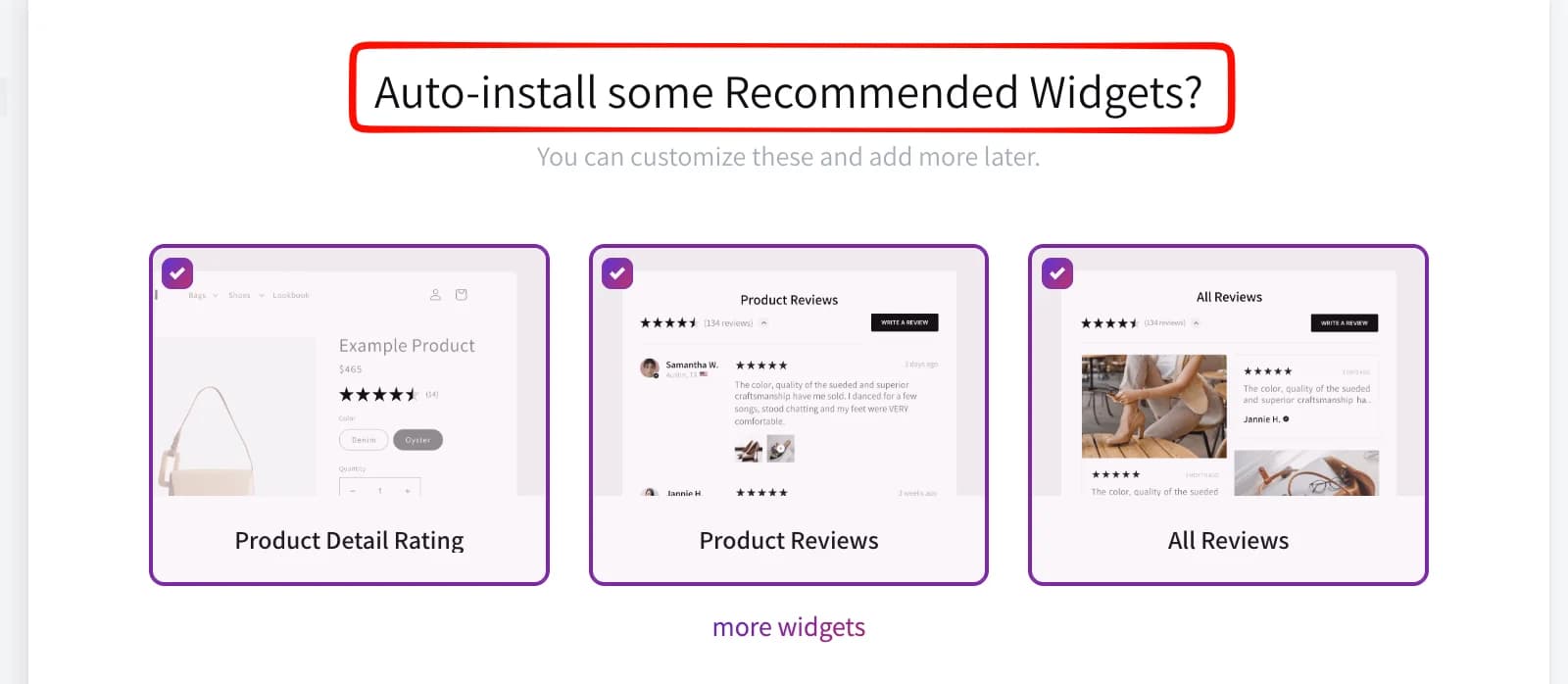
Fera collects product reviews through automated post-purchase emails and shows them through storefront widgets. The onboarding offers three to start: star ratings on the product page, a product reviews section, and an all-reviews display. Fera's pricing page includes a Q&A widget, testimonial carousels, media galleries and store-rating widgets on every plan, Startup included.
Beyond collection, the listing covers photo and video reviews, syncing reviews from Etsy, AliExpress and Google, review data in Google Search and Shopping, and rewards for reviewers through discounts, points or cashback. Integrations listed include Klaviyo and Smile.io. We did not test these areas; treat them as developer claims.
Fera Commerce launched the app on the Shopify App Store in June 2017. It carries the Built for Shopify badge. On September 25, 2026 it showed a 4.8 rating across 2,026 reviews.
What We Tested
We installed Fera Product Reviews in a Shopify admin and completed its onboarding wizard, which took about 10 minutes from start to the final plan screen.
The wizard ran inside Fera's admin, whose menu splits into Reviews, Photos & Videos, Widgets, Messages and Configuration. It covered an introduction to automatic review requests, a base theme for widgets, the choice between a hosted Fera page and an on-store review form, review-request timing and channel, an incentive for reviewers, auto-installation of recommended widgets, and a recommended plan.
This was an onboarding evaluation. We did not check how the widgets rendered on the storefront, send or receive a review request, submit or moderate a review, redeem a coupon, activate SMS, test imports or Google integrations, contact support, or run a store on a paid plan. We make no claims about those areas.
For these reasons, this is a Level 2 — Partial Hands-On Test.
Can You Set Up Review Collection Without a Developer?
Yes, at least for configuration. Every decision the first collection loop needs sits inside the wizard, and each one is a click rather than a form. The first screen carries a banner saying it is a visual demo and that your live store remains unchanged, so the early steps are safe to click through while you decide.
It starts with appearance. A Choose Base Theme for Widgets step shows style previews in a carousel; Fera says the choice becomes the base for storefront content. The next step asks where customers should leave their reviews: on a dedicated Fera-hosted page, or through a form embedded on your own store. Our run used the embedded form, which keeps customers on your domain.
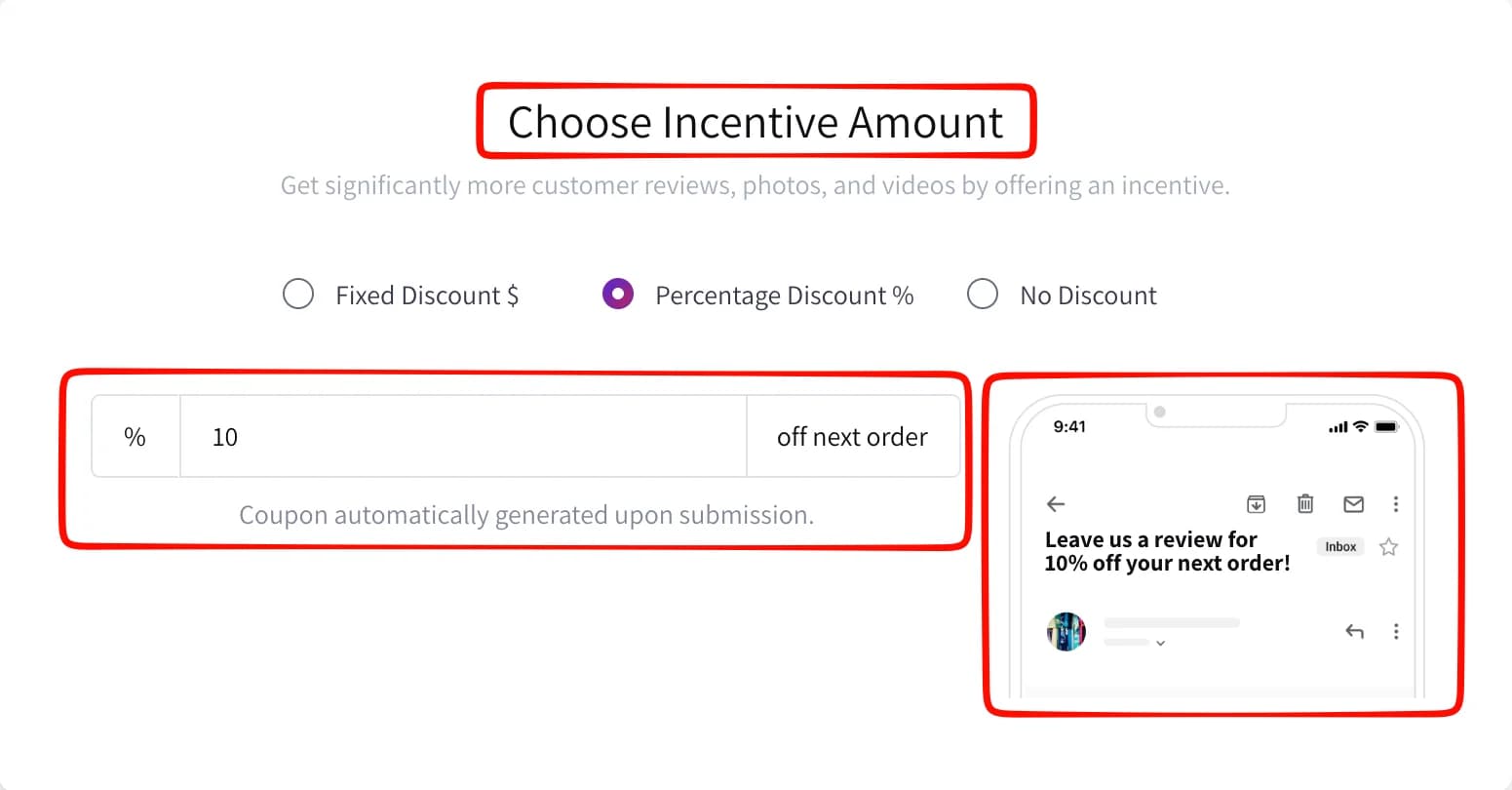
The incentive step is the most useful part of the first run. You choose a fixed discount, a percentage discount or none. Our run used 10% off the next order, and the screen states that the coupon is generated automatically when a review is submitted. A phone preview shows how the offer appears in the request email's subject line.
That saves creating discount codes by hand. Fera's help centre adds two details the wizard does not. Automatic coupon generation applies to Shopify stores. And a campaign-specific incentive is only earned when the customer reviews through that request's link, so a buyer who reviews another way gets no code. Incentivised reviews can also carry disclosure obligations, which the wizard does not raise. Check the rules that apply to you before switching it on.
The last configuration step auto-installs the three recommended widgets, all ticked in our run, and a note that you can customise them and add more later. We did not verify how they rendered on the storefront.
Where the Setup Promises More Than It Delivers
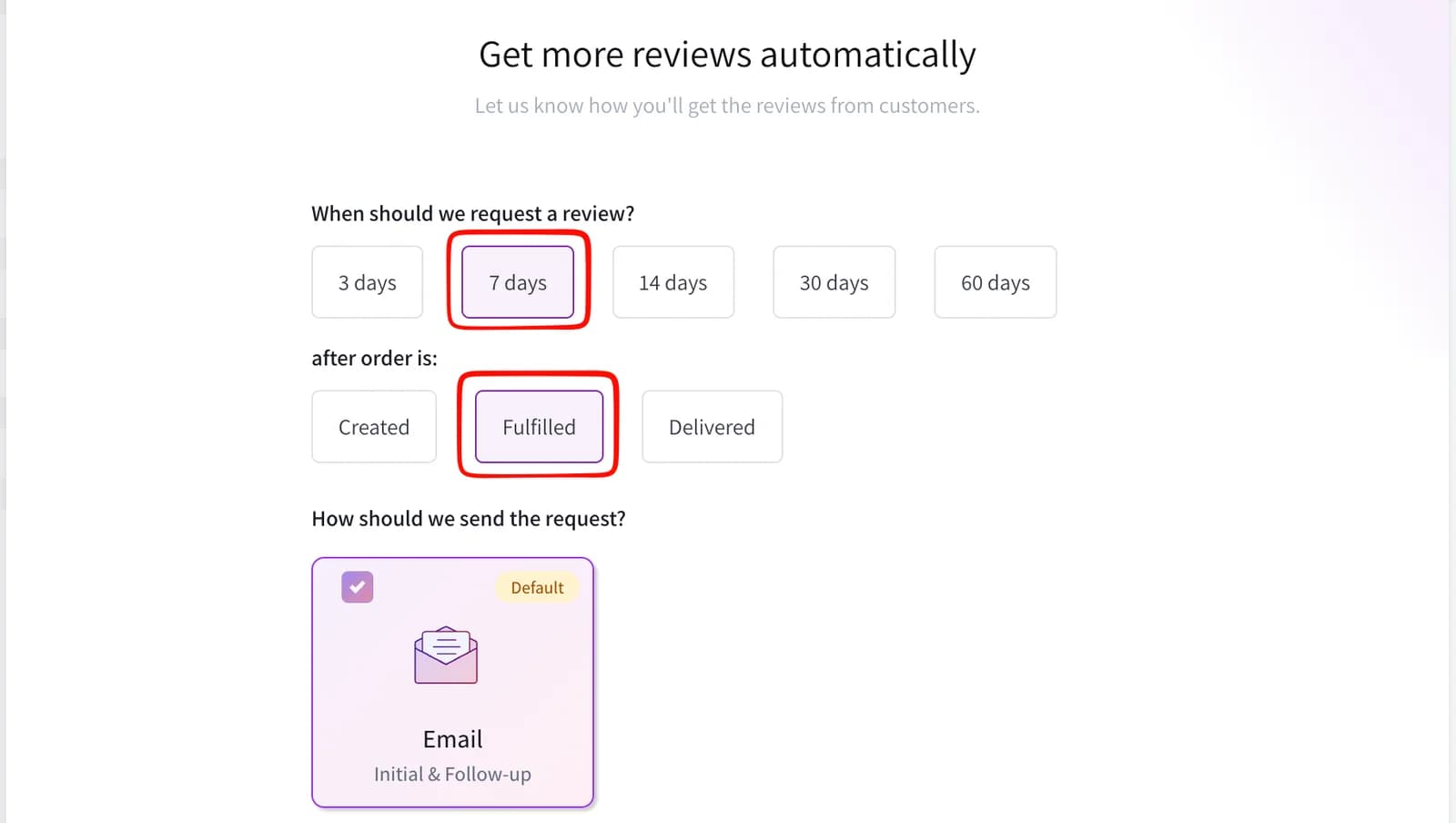
The request step is well designed. Five timing options, from 3 to 60 days, can follow an order being Created, Fulfilled or Delivered. Our run used 7 days after fulfilment. Fera's own help article recommends 14 days after fulfilment, and suggests matching the delay to how long your product takes to use.
The gap is the channel. The wizard's first screen says that when an order completes, Fera sends requests via Email and SMS. When we reached the request step, the only sending option was Email, Initial & Follow-up, marked Default. There was no SMS card to select.
Fera's help documentation explains where SMS actually lives. It is a beta feature activated later, from an automatic campaign's message settings, as a third request sent after the emails. It is available only to Shopify and Wix stores in the US and Canada, it needs customer phone numbers collected at checkout, and it is billed separately through Shopify at $5 for each review submitted through SMS, with a monthly spending limit you set. How to send SMS review requests
That is a fair model, since you pay only for results, but it changes the maths on Startup. Two SMS reviews cost more than a month of the plan. For most small stores, email is the channel to plan around; treat SMS as a paid top-up for non-responders, if your store is eligible. We did not activate SMS.
Pricing and Value
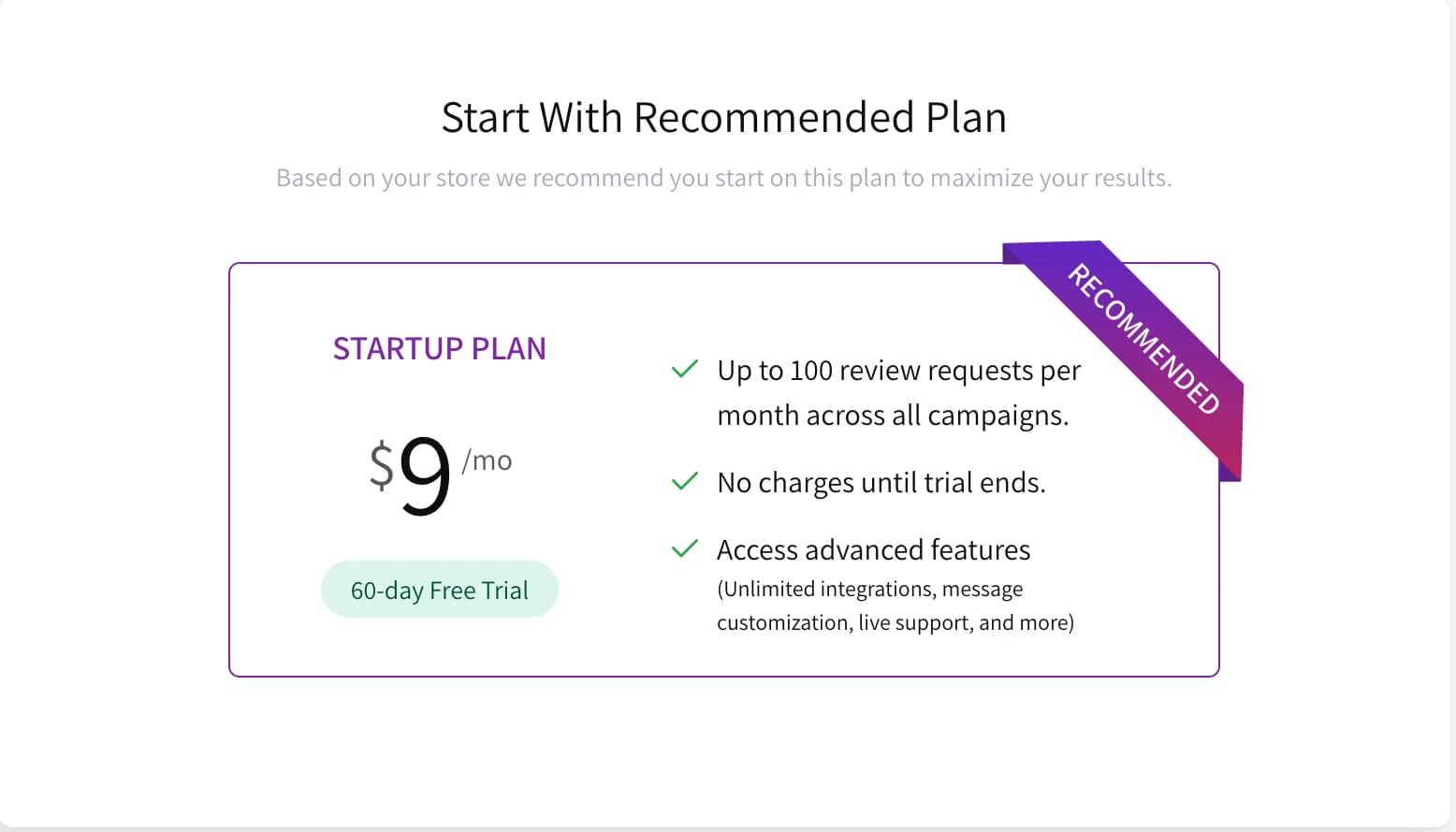
The wizard ends by recommending a plan "based on your store". For us that was Startup at $9 a month with a 60-day free trial. The other plans sit behind a Choose Other Plan link.
These are the figures on the Shopify listing on September 25, 2026. Every plan has a 60-day free trial and is billed monthly in USD.
| Plan | Price | Review requests / month | Orders / month | Users | Media storage | Cost per request at the cap |
|---|---|---|---|---|---|---|
| Startup | $9/month | 100 | 200 | 2 | 100MB | 9¢ |
| Small | $29/month | 1,000 | 2,000 | 3 | 1GB | 2.9¢ |
| Medium | $99/month | 10,000 | 20,000 | 5 | 10GB | about 1¢ |
| Semi-Large | $199/month | 25,000 | 50,000 | 7 | 50GB | under 1¢ |
Fera's own pricing page adds Large ($299), X-Large ($599) and Enterprise ($999) plans. Yearly billing brings Startup down to $7 a month and Small to $19. Fera pricing
There is no free plan. Fera announced that it was removing its free plan from April 1, offering existing free users a lifetime discount to upgrade, and pointing merchants who wanted a free app to Judge.me. If you are comparing Fera against apps with a working free tier, the real comparison is Fera's $9 against their $0.
How far 100 requests go
The request cap binds before the order cap. Fera's pricing page defines an order review request as the automatic request sent after a customer's order. If every order gets one, 100 requests covers 100 orders, and Startup's 200-order allowance never comes into play.
Follow-ups may halve that. Fera's help centre says the second request email is enabled by default and advises against turning it off, and our request step showed Email, Initial & Follow-up as the default. The onboarding card counts the cap "across all campaigns" but does not say whether a follow-up is a separate request. If it is, a store sending both emails reaches the cap at about 50 orders.
You can ration requests. Fera's campaign settings let you send only when conditions are met, such as a minimum order value or a customer country, and exclude products from review requests. A repeat-order setting controls whether returning customers are asked again. Switched on, a returning customer is asked on each new order until they review that product, which uses more requests. Automatic review requests
Going over means upgrading. Fera's pricing page says a store that exceeds its plan is asked to upgrade to the next plan. From Startup, that is a step from $9 to $29.
Which plan fits your order volume
Putting those rules together, this is how we would budget, assuming every order gets a request:
| Orders per month | Requests if follow-ups do not count | Requests if they do | Plan to budget for |
|---|---|---|---|
| Under 50 | Under 100 | Under 100 | Startup, $9 |
| 50–100 | 50–100 | 100–200 | Startup only if follow-ups do not count; otherwise Small, $29 |
| 100–500 | 100–500 | 200–1,000 | Small, $29 |
| 500–1,000 | 500–1,000 | 1,000–2,000 | Small, or Medium at $99 if follow-ups count |
The middle row is where the undocumented counting rule decides the price. If you sit there, the trial is the time to find out.
What Startup includes
Fera's plan comparison includes live chat and email support, multi-language support, the Q&A widget, photo and video reviews, and discount, loyalty-point and cash-back incentives on Startup. The support tooltip notes that plan level sets your priority in the queue. Small adds hiding Fera branding, custom email domains, product groups, multi-tier incentives and AI review replies. On Startup, requests are not sent from your own email domain, and Fera branding stays on your widgets.
What Public Sources Add
On September 25, 2026, we also read Fera's listing, pricing page, help centre and its recent one- to three-star merchant reviews. Low ratings are a small share: 36 one-star, 6 two-star and 5 three-star reviews out of 2,026. These are patterns from that negative slice, not findings from our test.
The clearest recent theme is billing and quotas. One long-time free user reported being charged after the free plan ended, without the notice they expected. One merchant in August 2026 reported that their widgets were switched off after exceeding an email quota. Fera replied that its notice had been unclear, issued a refund and said it was not holding reviews back. Other reports mention periods when widgets went offline in late 2025 and mid 2026, a Google Shopping feed that stopped working, and translation settings that are awkward to manage.
The five-star reviews from recent months commonly praise responsive support, useful help articles and an easy interface, including from merchants who have used Fera for several years.
What We Liked
- A genuinely guided first run: Style, submission location, timing, channel, incentive, widgets and plan are asked in a sensible order. We did not have to leave the wizard to work anything out.
- Incentives without manual codes: A percentage or fixed discount can be set in onboarding, with coupons generated automatically when a review is submitted.
- Flexible request triggers: Created, Fulfilled and Delivered triggers with delays from 3 to 60 days suit a wide range of product types.
- A choice of where reviews are written: A hosted Fera page or an embedded on-store form, decided up front.
- A generous Startup feature set: Fera's plan comparison includes live support, the Q&A widget, photo and video reviews and incentives on the $9 plan.
- A long trial: 60 days is enough time to see real orders turn into requests before you pay.
What Could Be Better
- The intro overpromises on SMS: It says requests go by Email and SMS, but the wizard sets up email only. SMS is a separate beta, limited to US and Canadian stores and billed per review.
- No free plan: The cheapest way to use Fera is $9 a month, and Startup's 100 requests leave little headroom.
- The request cap is ambiguous: Follow-ups are on by default, and Fera does not say whether they count as separate requests toward the 100.
- Plan information is split across sources: The Shopify listing shows four plans and an order limit; Fera's site shows seven plans and frames limits by requests.
- Quota behaviour is a merchant concern: A recent review describes widgets going offline after a quota was exceeded. We did not test the limits ourselves.
- Key workflows remain untested by us: Storefront rendering, request delivery, the review form, coupon issue, moderation, SMS and support were outside this evaluation.
Who Fera Product Reviews Is Best For
Fera suits a small Shopify store that wants automated, incentivised review requests running quickly and is comfortable paying a small monthly fee from the start. The wizard puts timing, discount and widget decisions in one place, so a merchant without a developer can go from install to a configured programme in one sitting. Stores taking well under 100 orders a month fit Startup, and the Q&A widget and live support make the $9 plan less bare than its request cap suggests. Stores that expect more orders should budget for Small at $29.
Who Should Upgrade or Consider an Alternative
If you want to run reviews for free, Fera is no longer an option; Fera itself points free-plan merchants to Judge.me. If SMS requests are essential and your store is outside the US or Canada, Fera cannot send them yet. If you need to remove Fera branding, send from your own email domain, or use more than two logins, plan for Small or above.
We have separately tested Judge.me, which has a free plan and a flat $15 paid tier, Junip, whose free plan has no order cap, and Loox, built around photo reviews. Those were separate setup evaluations, not a controlled head-to-head, so we are not ranking them here.
What to Check During the 60-Day Trial
Our test stopped at onboarding, so these are the checks that would settle the questions it left open. Each takes minutes on a real or test order.
- Look at the widgets on a product page, on desktop and mobile, before any reviews arrive. Confirm the auto-install placed the star rating and reviews section where you expect.
- Place and fulfil a test order to an inbox you can read. Confirm Fera schedules the request, and that it arrives at the delay you chose.
- Check the request counter after the follow-up sends. This answers whether Startup's 100 covers 100 orders or about 50.
- Submit a review with a photo through the email link. Confirm the review appears in Fera's admin, how it is moderated, and that it shows on the product page.
- Use the coupon at checkout. Confirm the discount generates on submission and applies to a real cart.
If all five pass and your volume fits the table above, Startup is a sound $9. If the counter shows follow-ups count and you are near the limit, go straight to Small.
Final Verdict
Fera answers the setup half of our question well. A small Shopify store can configure request timing, a review incentive and three storefront widgets in about 10 minutes without a developer. The wizard is clear, and automatic coupons are a practical touch.
The value half needs more care. Startup's $9 buys 100 requests a month with no free plan behind it, and with follow-ups on by default that may cover as few as 50 orders. SMS, promised on the first screen, is a separate per-review charge available only in the US and Canada.
- Start the 60-day trial if you want incentivised email requests running today and take under 50 orders a month, or up to 100 once the trial shows follow-ups do not count.
- Budget for Small at $29 if you take more than 100 orders a month, or more than 50 once follow-ups prove to count, or if you want your own email domain and no Fera branding.
- Look elsewhere if you need a free plan, or SMS requests outside the US and Canada.
Whichever you choose, run the five trial checks above before the trial ends. They cover the loop our test did not reach, and they are what proves Fera is worth paying for.
Frequently Asked Questions
Is Fera Product Reviews free?
No. Fera removed its free plan. Every plan now has a 60-day free trial on the Shopify listing, after which the cheapest option, Startup, costs $9 a month.
How much does Fera cost?
On the Shopify listing, Startup is $9 a month for 100 review requests, Small $29 for 1,000, Medium $99 for 10,000 and Semi-Large $199 for 25,000. Fera's own pricing page lists larger plans up to Enterprise at $999, and yearly billing lowers Startup to $7 a month and Small to $19.
Does Fera send review requests by SMS?
Yes, with conditions. Fera's help centre describes SMS as a beta feature for Shopify and Wix stores in the US and Canada, sent after your request emails and billed at $5 for each review submitted through SMS. Your store must collect phone numbers at checkout. The onboarding wizard does not set it up; in our run, the only sending option was email.
What happens if I go over Fera's review request limit?
Fera's pricing page says stores that exceed their plan's limits are asked to upgrade to the next plan up. One merchant reported in August 2026 that their widgets were switched off after exceeding a quota; Fera said its notice had been unclear. Keep an eye on your usage during the trial.
Can Fera give customers a discount for leaving a review?
Yes. The onboarding wizard offers a fixed or percentage discount, or none, and says the coupon is generated automatically when a review is submitted. Fera also supports Smile.io loyalty points and cash-back as incentives. We configured a 10% discount but did not submit a review to receive one.
Does the Startup plan include live support?
Yes, according to both sources we checked. The onboarding plan card lists live support, and Fera's plan comparison marks live chat and email support as included on Startup, with plan level setting your priority in the queue. We did not contact support.